XTEINK X3 vs X4: Which One Should You Choose?
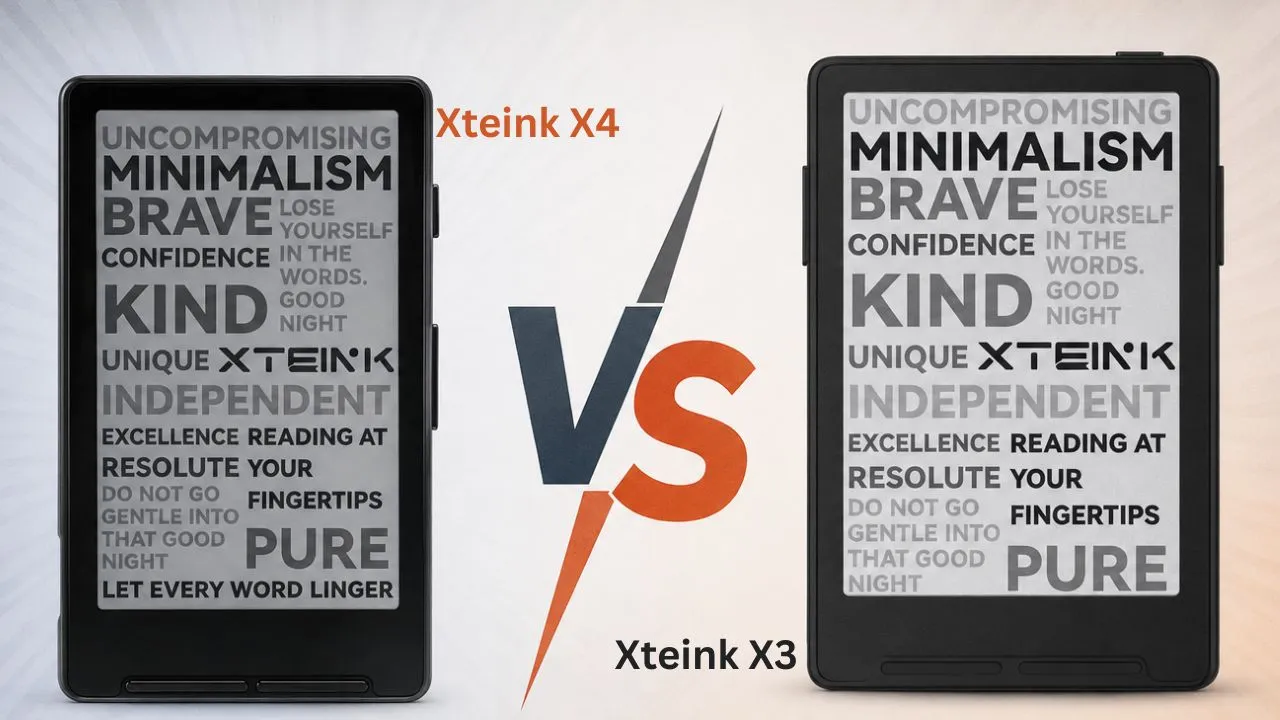
Xteink makes some of the smallest E Ink readers on the market, and the X3 and X4 are its two flagship pocket-sized models. Both skip Android, apps, and notifications in favor of a distraction-free screen built purely for reading, and both cost less than an entry-level Kindle.
So which one should you buy? If you want the smallest, sharpest reader money can buy, go with the X3. If you want a bigger screen and universal USB-C charging, the X4 makes more sense.
Beyond size and charging, the two split on weight, price, and a handful of extra features like the X3’s shake-to-turn gyroscope and NFC chip that matter more than you’d expect. This guide breaks down every spec, every trade-off, and every real-world detail so you can pick the right one for your reading habits.
Disclosure: This post contains affiliate links for XTEINK’s Affiliate+ campaign. I may earn a commission on qualifying purchases made through these links, at no extra cost to you.
XTEINK X3 vs X4 Comparison Table
| Feature | XTEINK X3 | XTEINK X4 |
|---|---|---|
| Display size | 3.7 inch | 4.3 inch |
| Resolution | 259 PPI | 220 PPI |
| CPU | ESP32 | ESP32 |
| Dimensions | 97.6 x 63.7 x 5.1 mm | 114 x 69 x 5.9 mm |
| Weight | 58g | 77g |
| Charging port | Magnetic pogo pin | USB-C |
| Battery | 650 mAh, up to 14 days | 650 mAh, up to 14 days |
| Storage | 16 GB (expandable to 256 GB) | 16 GB (expandable to 256 GB) |
| Sensors | Gyroscope shake-to-turn, NFC | None |
| Touchscreen | No | No |
| Front light | No | No |
| Formats | EPUB, TXT, JPG, BMP, BIN fonts | EPUB, TXT, JPG, BMP, BIN fonts |
| Price | Check Price | Check Price |
What Are the XTEINK X3 and X4?
Xteink built its reputation on tiny E Ink readers that skip the bloat of Android tablets and just focus on reading. The company uses simple ESP32 boards instead of full smartphone chips, which keeps the devices thin, light, and cheap to produce.
The X4 arrived first with a 4.3-inch, 220ppi screen, USB-C charging, and a 650mAh battery that lasts around two weeks per charge. It ships small enough to stick onto the back of a phone case, though this attachment works best on smaller phones. It barely fits on something as large as an iPhone Pro Max. The X3 followed as a smaller, credit-card-sized sibling with a sharper display and a more integrated magnetic back, but it trades USB-C for a less common magnetic pogo-pin charger, a change that you can flag as its most significant drawback.
These readers target commuters who want something distraction-free for short reading bursts. Minimalists who hate carrying a full-size Kindle also gravitate toward this category, since neither device runs apps, browsers, or notifications; both are limited to TXT and EPUB files (plus JPG and BMP for images) and support only DRM-free content.
Display and Screen Comparison
This is the biggest practical difference in the XTEINK X3 vs X4 debate. The X3 uses a 3.7-inch display with 259 PPI, while the X4 uses a 4.3-inch display with 220 PPI. On paper, the X3 looks sharper, but the X4 gives you more room for text on each page.
That trade-off shapes the whole reading experience. The X3 looks crisper because it packs more pixels per inch into a smaller screen, but the X4 often feels more comfortable during longer reading sessions because it shows more text and requires fewer page turns.
The X3 is ideal for short reading bursts and one-handed use, while the X4 is the safer pick for people coming from a Kindle or Kobo who want a more familiar reading feel.
Neither model includes a front light or a touchscreen. You control both with physical buttons, which keeps the experience simple but also means night reading depends on external light.
Hardware and Performance
In day-to-day use, these two readers perform more alike than different. Both models run on the ESP32-C3 chip, and the open-source CrossPoint firmware now officially supports both the X4 and the X3, giving you a cleaner interface and better ebook formatting than the stock software.
Storage is nearly identical too. 16 GB microSD storage comes standard on both models with expansion up to 256 GB, though some retail listings advertise the X4 with 32 GB instead. Either way, 16 GB alone can hold hundreds of EPUB and TXT files, so space is rarely a real limitation.
Supported reading formats stay the same across both devices: EPUB and TXT for text, JPG and BMP for images, and BIN for custom fonts.
The X3 does add a few extra tricks. It includes a gyroscope for shake-to-turn page gestures, an NFC chip for scanning transit cards or gym passes, and a stock interface that shows a visible clock and battery percentage. You might like the shake-to-turn feature at first, but after a few accidental page flips during your commute, you’ll probably turn it off. So the X3 gives you more features, but those extras don’t automatically make it the better reader for everyone.
Charging Ports and Connectivity
This is where the two models split the most. The X4 uses USB-C, while the X3 uses magnetic pogo pins on the back for charging. If you hate carrying a special cable, the X4 immediately wins this round. For someone who owns a drawer full of USB-C cables, having a USB-C port removes a small daily headache.
The X3, on the other hand, requires the specific cable that comes in the box. If you lose it, you can’t just grab a spare from your drawer; you’d need to buy a replacement or a third-party dongle instead.
That difference affects more than charging. The port also matters when you want to connect to a computer or flash firmware, so USB-C feels simpler and more universal over time.
Both models connect via 2.4 GHz Wi-Fi and Bluetooth, so wireless performance remains consistent between them. Neither one gains an edge in day-to-day connectivity.
Battery Life and Daily Use
Both readers have 650 mAh batteries. Xteink kept battery size the same even though the X3 and X4 use different bodies and screen sizes. That gives both models a strong base for light daily reading.
Xteink rates the X3 for 10 to 14 days and the X4 for up to 14 days, both under one to three hours of daily reading. Those numbers align with what we want from a travel reader: long standby time, light charging needs, and less cable stress.
Daily use feels a bit different between the two models beyond just charge duration. The X3’s always-on clock and battery readout, mentioned earlier, comes in handy specifically during short reading bursts, where knowing the time matters. The X4 skips this out of the box and focuses more on the text itself, though community firmware like Cross Point can add a battery indicator if you want that data back.
That long battery life also weakens the X3 charging complaint a little. You will not need the pogo-pin cable every day. Even so, people who travel often may still prefer the X4 because USB-C removes the risk of leaving a special cable at home.
Real-world use supports the official claims. A long reading run dropped the battery by only about 12 percent; both ereaders can last through many sessions before needing power. The battery felt very solid and easy to forget about during trips shorter than two weeks.
That kind of battery life fits the whole pocket-reader pitch. You can toss either reader into a bag, leave it there, and still expect it to wake up ready for a reading break days later. Whether you lean toward the X3 for its always-visible battery readout or the X4 for its universal USB-C cable, neither device will demand your attention with frequent charging.
Design, Size, and Build Quality
Weight and dimensions create the most obvious physical difference between these two readers. The X3 weighs about 58 grams and measures 97.6 by 63.7 by 5.1 millimeters. The X4 weighs in heavier at 77 grams, with dimensions of 114 by 69 by 5.9 millimeters.
That gap matters if you plan to attach the reader to the back of your phone using the included magnetic rings. The X3 fits comfortably on most phone cases and even sticks to smaller phones without hanging off the edge. The X4 works with larger phones like the iPhone Air, but usually needs to be oriented upside down to align with the MagSafe magnet.
Both models come in Space Black and Frost White. However, several users report a sun-fading issue on white X4 units, in which the screen or housing discolors after repeated outdoor exposure. It’s unclear whether the color or the model itself drives the difference.
Button placement also splits opinion. The X3 places the power, volume, and reset buttons on one side, making it easier to use one-handed. The X4 spreads buttons across both sides, giving it a more traditional layout that feels closer to a standard e-reader.
Price and Value Comparison
Officially, the X3 lists for $79, while the X4 lists for $69, making the smaller device the pricier one despite its size. Xteink often runs discounts on its own site, so actual sale prices can be closer to $69 for the X3 and even lower for the X4, depending on ongoing promotions.
Both readers undercut mainstream e-readers by a wide margin. An entry-level Kindle starts around $109.99, which makes either Xteink model a budget pick by comparison.
Here’s what typically ships in the box for each model:
- X3: e-reader, card reader, quick start guide, matte screen protector, two magnetic stick-on rings, magnetic pogo pin charging cable, and a pre-installed 16 GB microSD card
- X4: e-reader, quick start guide, microSD card, matte screen protector, and two magnetic stick-on rings
Notice the X3 includes an extra card reader and its proprietary charging cable, which partly explains the higher price tag despite the smaller screen. If you’re chasing a pocket eReader in 2026, either model beats a used Kindle on price, though neither supports a bookstore, a browser, or third-party apps out of the box.
Which Should You Buy?
Neither model is objectively better, and that’s the real answer to the XTEINK X3 vs X4 question. It depends on how you plan to carry and use it, not on which device is technically “superior.” Anecdotal chatter from owners backs that up: some swear by the X3’s portability, others insist the X4 is the smarter buy for most people, and plenty of people who’ve tried both go back and forth.
Choose the X3 if you read in short bursts, want the sharpest possible text, or plan to attach the reader to your phone case using the magnetic rings. Its lighter weight and smaller footprint make it disappear into a pocket in a way the X4 simply can’t match.
Choose the X4 if you’re coming from a Kindle or Kobo and want a screen that feels closer to what you’re used to. The USB-C port also means one less cable to keep track of, which matters if you already carry USB-C accessories for your phone and laptop.
If you read mostly during commutes, in waiting rooms, or in other short windows, the X3’s size and sharper display make it the more practical daily carry. If you read in longer sessions and prioritize charging convenience over ultimate portability, the X4 remains the safer, slightly cheaper choice. Either way, you’re getting weeks of battery life, a distraction-free reading experience, and a price well below what mainstream e-readers charge.
Trust your own daily habits over any single verdict here.
Recommended Reading
How to Install CrossPoint Firmware on XTEINK X4 e-Reader
Both the X3 and X4 support CrossPoint’s open-source firmware for a cleaner interface and better formatting, but this guide walks through the actual installation process step by step. If you’re leaning toward the X4, it’s the natural next read before you unbox your new device.
5 Best Small E-Readers That Fit Right in Your Pocket
Already leaning toward the X3 or X4 for its pocket-friendly size? This roundup stacks it against other compact e-readers on the market, helping you confirm whether Xteink’s tiny form factor truly beats the competition or if another pocket-sized option deserves a spot in your bag instead.