BOOX Tappy: What You Need to Know
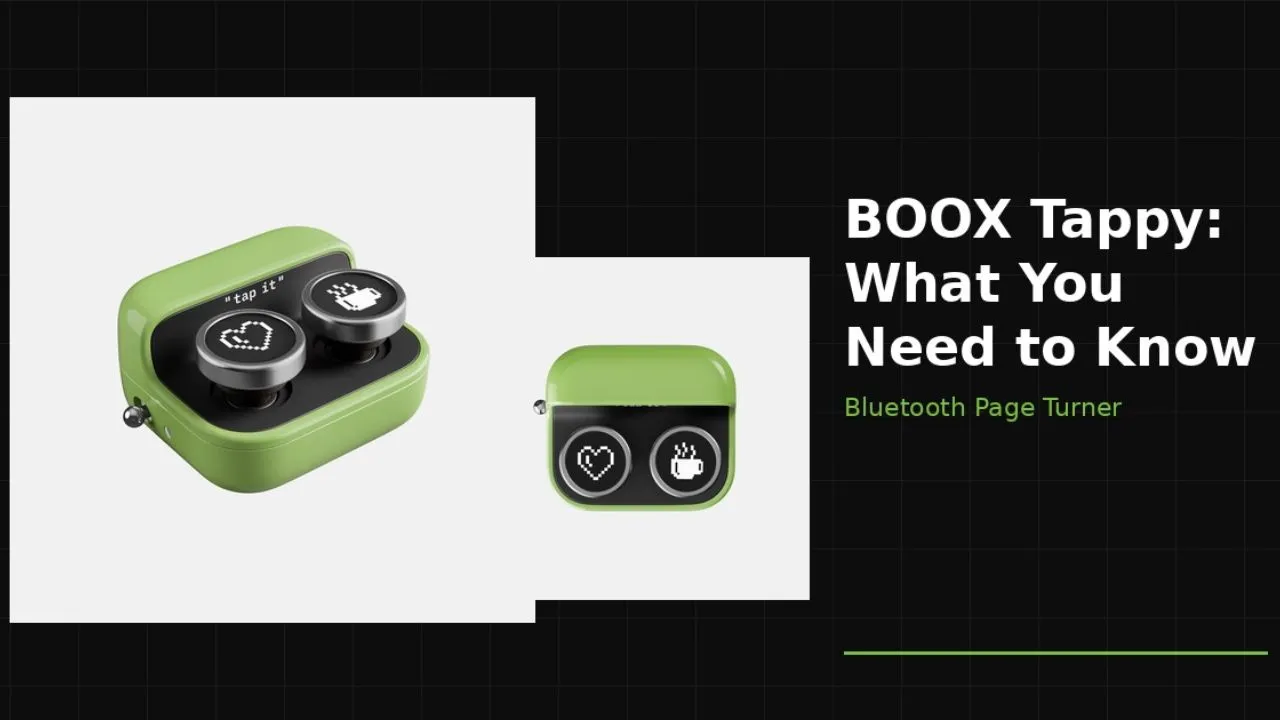
Reading on a BOOX device feels great until your hand keeps leaving the page. BOOX Tappy tackles that problem with a tiny Bluetooth remote that turns pages, scrolls through long screens, and controls audio on supported BOOX devices.
If you read in bed, prop a tablet on a stand, or use a Palma around the house, the BOOX Tappy makes more sense than it might at first appear. Keep your grip on BOOX Tappy, stay in the book, and stop reaching for the screen every few seconds.
What Is the BOOX Tappy?
BOOX built Tappy as a two-button wireless page turner for its ePaper lineup. Instead of reaching up to the screen every few seconds, you press a button and keep reading.
That sounds small, but it changes the feel of long reading sessions. BOOX pitched Tappy around bed reading, couch reading, and stand-based setups, where one extra hand movement can break your focus.
Many page turners for e-readers use a clip-on piece that touches the screen, but BOOX uses Bluetooth control instead, so you do not need a fake finger on the display. That choice gives Tappy a cleaner look and a wider range of jobs than screen-tap accessories usually offer. You can use it for long articles and audio playback, which makes it closer to a tiny multi-use remote than a single-task add-on.
Quick Specs at a Glance
| Feature | Detail |
|---|---|
| Dimensions | 43 x 37 x 25 mm |
| Weight | Approx. 29 g (1.02 oz) |
| Connectivity | Bluetooth |
| Charging | USB-C (cable not included) |
| Modes | Reading, Browsing, Multimedia |
| Compatibility | BOOX devices with firmware V4.2+ |
| Extras | 2 spare keycap sets, lanyard hole, rubber feet |
| Price | Check Price |
Small Design with a Solid Feel
The BOOX Tappy stays tiny on purpose. The official spec sheet lists dimensions of 43 x 37 x 25 mm and a weight of about 29 grams. That makes it about the size of a large strawberry. You will hardly notice the weight when you hold it in your palm.
The body includes two front buttons, a power switch, a USB-C charging port, and an indicator light. The buttons are clicky and responsive.
BOOX used a metal body for this device. It feels sturdy and well-made. It does not feel like a cheap plastic toy. The bottom has rubber feet. These feet stop the device from sliding around if you place it on a desk.
You will also find a lanyard hole on the side. This small detail lets you hang the device around your neck. You can just press the buttons while the remote rests on your chest. This setup works well for people who want to keep their hands completely free.
Three Modes, One Small Remote
Tappy goes beyond a basic page-turner. It runs in three distinct modes, and switching between them takes only a few seconds.
Reading mode is the default. Press the right button to go forward, press the left button to go back. That is it. No swiping, no repositioning your hand. You can read with your device propped on a stand across the room and still control every page turn from the couch.
Browsing mode switches the buttons to scroll up and scroll down. This works well for websites, long documents, or any app that uses vertical scrolling rather than page flips. Instead of constantly reaching up to drag your finger down the screen, you tap the Tappy once.
Multimedia mode turns the Tappy into a basic media remote. You can skip tracks, rewind, or play and pause audio on your BOOX device without picking up the tablet. This is particularly useful if you listen to audiobooks or music while doing something else around the room.
Switching between modes is straightforward. Hold both buttons down for a few seconds, and the device cycles to the next mode. An indicator light gives you clear feedback for pairing, mode changes, and low battery, so you always know where you stand.
Setting It Up
Pairing the Tappy with a BOOX device takes about 30 seconds. Turn on Bluetooth on your device, power on the Tappy, then hold both buttons for around seven seconds until the indicator light starts blinking. The device shows up in your Bluetooth list as “BOOX Tappy,” and you tap Pair. Done.
After pairing, the device walks you through a short on-screen tutorial covering reading, browsing, and multimedia modes. Even if you have never used a page-turner before, the setup feels natural and fast.
Who Is It Compatible With?
The Tappy works with any BOOX device running Firmware V4.2 or later that supports Bluetooth. That covers a wide range of current and recent hardware, including:
- Note Air5 C
- Palma 2 Pro
- BOOX Go 10.3 and Go 10.3 Gen II
- Note Max
- Tab XC
- BOOX Palma (original)
BOOX also says the Tappy can pair with non-BOOX devices like smartphones, tablets and laptops, giving it some versatility as a basic media remote. If you run a BOOX device on firmware older than 4.2, check your firmware version before buying.
Battery Life and Connectivity
The Tappy runs on a 95mAh rechargeable battery. BOOX says it lasts several weeks on a charge under normal reading use. An indicator light shows you pairing status, mode changes, and low battery warnings so you never get caught off guard.
Bluetooth range reaches nearly 33 feet, which is far more than you need at a desk or in bed. That range enables practical uses beyond reading, such as controlling a BOOX device mounted on a stand across the room.
How the BOOX Tappy Feels in Real Use
The response time fast and consistent. The button press registers immediately, with no lag between click and page turn.
The clicky button gets positive marks, too. It gives satisfying physical feedback with each press, so you always know the click registered. For people who wanted something quieter than tapping on a screen, the Tappy fits.
In longer reading sessions, holding a device for hours tires out your arms and wrists. With the Tappy, you set the device on a stand or prop it up and handle everything with one small remote.
Pros and Cons
Pros
- Excellent for hands-free reading
- No clip-on screen mechanism
- Good Bluetooth range
Cons
- Requires BOOX firmware 4.2+
Who Actually Needs This?
Let’s be honest: not every BOOX owner needs a Tappy. If you hold your device in both hands during a short reading session, you will likely do just fine with the touchscreen.
But a few groups of readers will find real value here.
First, anyone who reads with their device propped up on a stand. If your tablet, whether a Note Max, Tab X C, or any other large BOOX device, sits on a desk or nightstand while you lie in bed or sit back in a chair, reaching the screen on every page is genuinely disruptive. The Tappy lets you keep your arms wherever they are comfortable, with a Bluetooth range of up to 33 feet, so you can control page turns from across the room.
Second, readers with limited hand mobility or repetitive strain concerns. It is assistive technology that eliminates the need to swipe repeatedly and allows people with mobility issues to interact with their device more comfortably. You can also disable all on-screen gestures entirely and rely only on the Tappy, which eliminates accidental screen touches from palm rejection errors, a particularly useful option on larger ePaper screens.
Third, note-takers who use BOOX for writing. If you work in the notes app and constantly swipe to move between pages of handwritten notes, the Tappy handles that navigation while you keep your stylus in hand. No repositioning, no breaking your writing flow.
If none of these situations sound familiar, if you already hold a small reader comfortably in one hand and never use a stand, the Tappy will likely feel like an extra rather than a solution. The device makes the most sense when it removes a real friction point you run into every single day.
Final Take
The BOOX Tappy does one job and does it well. It keeps you from breaking your reading flow just to interact with your device. If you read for long stretches, prop your device on a stand, or want cleaner page-turning without relying on screen gestures, the Tappy earns its place. For occasional readers who just pick up a device and swipe, the investment probably will not feel worth it. Know your reading habits before you buy.
Recommended Reading
5 Best Kindle Page Turners for Effortless Reading
If the BOOX Tappy has you thinking about hands-free reading accessories more broadly, this roundup puts the best page turners side by side. It’s useful context whether you’re committed to the BOOX ecosystem or curious how Tappy stacks up against alternatives built for other e-readers.
Everything You Need To Know About Boox Palma
The Tappy pairs especially well with the Palma for one-handed, around-the-house reading. If you’re not already familiar with that device, this deep dive covers the hardware, software, and use cases that make the Palma one of the more interesting BOOX products to use with a remote like Tappy.