Moto Pad 2026 Review: Best Budget Tablet This Year?
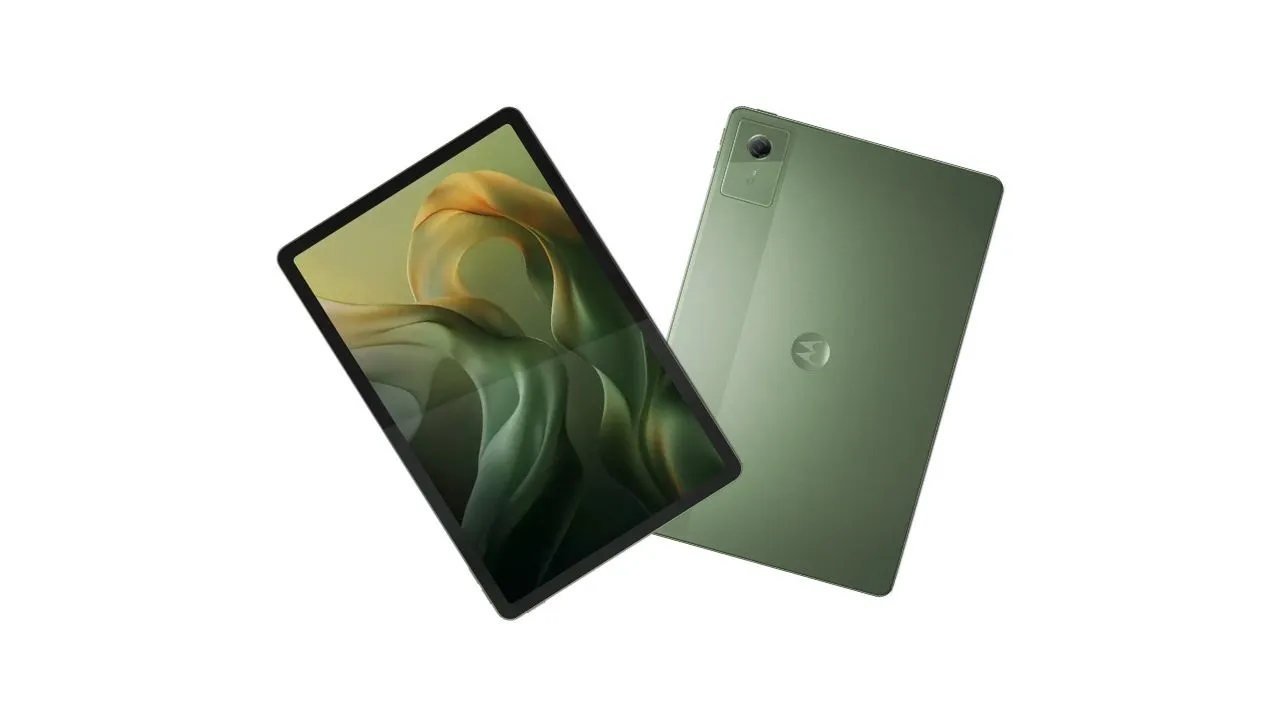
Motorola just re-entered the US tablet market after over 15 years away, and the $249.99 Moto Pad 2026 is their opening move. It packs an 11-inch 2.5K display, 5G connectivity, Dolby Atmos quad speakers, and 8GB of RAM into an aluminum body that genuinely feels premium for the price. The real question is whether it earns its $249 price tag in a crowded budget Android tablet market. Here is what you actually need to know before buying.
Quick Specs at a Glance:
- Display: 11-inch IPS LCD, 2560×1600 (2.5K), 90Hz, 500 nits
- Chipset: MediaTek Dimensity 6300 (octa-core)
- RAM / Storage: 8GB RAM / 128GB, microSD up to 2TB
- Battery: 7,040mAh, 20W charging
- OS: Android 15
- Connectivity: 5G, Wi-Fi 5, Bluetooth 5.2, GPS
- Cameras: 8MP rear / 5MP front
- Weight: 480 g / 16.93 Ounces
- Price: Check Price
Design and Build Quality
Premium Aluminum Build at a Budget Price
Pick up the Moto Pad 2026, and you immediately notice it does not feel like a $249 tablet. Motorola went with an aluminum unibody chassis, and the result is a device that feels noticeably more solid than the plastic-backed competitors that dominate this price range. At 6.99mm thin and 480 grams, it sits comfortably in your hands during a long streaming session without feeling like a brick.
For context, most budget tablets at this price use polycarbonate backs that flex and creak. Motorola skipped all of that and delivered something that actually looks the part.
Ergonomics, Layout, and Color
The tablet ships in a single colorway called Pantone Bronze Green, and it actually looks great in person. The two-tone back, with the Motorola emblem at the center, gives it a clean, understated look that stands out from the sea of generic gray-and-black slabs. The power button sits at the top, with a volume rocker alongside it. USB-C lives at the bottom, flanked by two of the four speakers. The SIM tray, which houses both the nano-SIM and microSD card slot, sits on the right side.
One practical note:
Pogo pins sit along the bottom edge, which means you can snap on a compatible keyboard case down the road. Stylus users will need to find their own case solution, though, since no pen attaches magnetically to the chassis.
Durability Considerations
The Moto Pad 2026 carries an IP52 rating, which provides basic protection against light splashes, enough for accidental spills but not submersion. Keep it away from pools and sinks, and you will be fine. That said, IP52 is a respectable inclusion at this price point, where many rivals ship with no water resistance rating at all. What Motorola also includes is TÜV Rheinland certification for both Flicker Free and Low Blue Light performance, which matters if you or your kids use this device for extended reading or studying.
Display Performance

11-Inch 2.5K Panel: Sharpness and Clarity
The display is where the Moto Pad 2026 earns serious respect. The 2560×1600 resolution at 275 PPI delivers sharp, crisp text and clean image detail that you genuinely do not expect from a $249 tablet. It’s a standout feature; it clearly outperforms the Samsung Galaxy Tab A11 Plus display, which uses a lower-resolution panel.
The color gamut hits 72% NTSC, which serves streaming and casual use well. It will not satisfy a photo editor or video colorist, but for Netflix, YouTube, and web browsing, the colors look vibrant and accurate.
90Hz Refresh Rate and Smooth Scrolling
The 90Hz refresh rate keeps everything feeling fluid. Scrolling through social media, swiping between apps, and navigating menus all exhibit the smoothness that a 60Hz panel simply cannot match. The iPad 11, which costs $349, only runs at 60Hz. Motorola wins this comparison outright.
Brightness, Outdoor Use, and Eye Comfort
At 500 nits peak brightness, the display handles indoor use easily. That figure edges out the Galaxy Tab A11 Plus at 480 nits. Outdoor use in direct sunlight will test its limits, but bright shade and most indoor environments present no issues.
The TUV Rheinland Low Blue Light certification makes this tablet a solid choice for students or anyone who logs long hours reading or studying. Eye fatigue adds up fast on non-certified displays, and Motorola addressed that directly here.
Performance and Chipset
MediaTek Dimensity 6300 in Real-World Use
The Dimensity 6300 is an octa-core chip built on TSMC’s 6nm process, with two performance cores running at 2.4GHz (Cortex-A76) and six efficiency cores at 2.0GHz (Cortex-A55), paired with a Mali-G57 MC2 GPU. On paper, it sits in the lower mid-range category. In practice, daily tasks run surprisingly smoothly, browsing, streaming, multitasking across a few open apps, reading PDFs, and video calls all perform without frustrating lag.
Part of that smoothness comes from what Motorola did with the software. They kept Android clean and lightweight, so the Dimensity 6300 does not fight against a heavy OS skin. That is in direct contrast to Samsung’s One UI, which adds significant overhead even on stronger chips.
RAM, Storage, and Expandability
Eight gigabytes of RAM gives the Moto Pad 2026 an edge over the Galaxy Tab A11 Plus, which ships with only 6GB. That extra RAM shows up in real use. You can keep more apps loaded in the background without the system kicking things out of memory.
The 128GB base storage leaves about 109GB accessible after the OS takes its share. The microSD slot supports cards up to 2TB, making this a legitimate media storage device for travelers, students, or anyone who downloads large libraries of content offline.
Gaming and Heavy Workloads
Let’s break this down honestly. Light gaming works fine here. Titles like Asphalt Legends run well, and most regular mobile games are manageable on low to medium settings. The Mali-G57 MC2 GPU benchmark scores confirm it handles everyday graphics tasks adequately.
You hit the wall with GPU-intensive titles like Genshin Impact on high settings, competitive FPS games, or any 4K video editing workflow. Those tasks will struggle or simply not be practical on this chip. If gaming is your primary use case, skip this one. Check out tablets built specifically for gaming that can handle GPU-intensive titles without compromise.
Software and Smart Features
Android 15 and Motorola’s Software Layer
The Moto Pad 2026 ships with Android 15, which is already behind the curve, given that Android 16 has been available for some time in 2026. That said, the software experience itself is clean. Motorola keeps the skin minimal, essentially a near-stock Android experience with a handful of useful additions and mostly Google apps pre-installed.
The software update timeline is the harder conversation to have. Based on Motorola’s track record with budget devices, expect roughly two years of major OS updates and three years of security patches. Samsung now offers seven years of updates on comparable devices, so this gap significantly hurts the Moto Pad’s long-term value story.
Smart Connect: Cross-Device Workflow
Smart Connect is one of the more useful software additions Motorola built into this tablet. It lets you link your phone, tablet, and PC together to share files, open apps, and access content across devices without manual transfers. Start reading a document on your phone, switch to the tablet for the bigger screen, Smart Connect handles that transition without you hunting through files. For a remote worker or student who bounces between devices throughout the day, this feature adds genuine daily value.
PC Mode and Stylus Support
PC Mode transforms the interface into something resembling a desktop OS. A taskbar appears along the bottom, windows open in resizable frames, and apps behave more like they do on a laptop. It functions similarly to Samsung’s DeX feature, and it pairs well with a Bluetooth mouse and a keyboard case connected via the pogo pins.
On the stylus side, both the Lenovo Tab Pen Plus and the standard Lenovo Tab Pen work with the Moto Pad 2026. A dedicated Moto Pen is listed as an official accessory, though compatible Lenovo pens are available right now. However, the pen does not magnetically attach to the tablet chassis, so you need a case with a pen holder to keep it secure.
5G Connectivity and Network Performance
Why 5G Matters on a $249 Tablet
Most tablets at this price point offer Wi-Fi only. The Moto Pad 2026 includes full 5G support, plus eSIM and nano-SIM compatibility, making it a standalone connected device that doesn’t require a phone hotspot. That is a genuine differentiator in the budget 5G tablet segment for 2026.
T-Mobile and Metro by T-Mobile carry the device, with Metro offering it at $49.99 plus $20/month on a plan. For someone looking for a 5G tablet under $300 in the US market, the options are genuinely limited, and the Moto Pad fills that gap.
Wi-Fi, Bluetooth, and GPS
Wi-Fi 5 (802.11ac) handles typical home and office wireless speeds without issue. Bluetooth 5.2 connects reliably to keyboards, earbuds, and peripherals. GPS, GLONASS, and Galileo support round out the navigation picture. If you want to use this as a dashboard or travel navigation device, the hardware is there to support it without a separate GPS unit.
Camera System
8MP Rear Camera: Documents and Quick Snaps
The cameras on the Moto Pad 2026 serve a specific purpose: utility. The 8MP rear shooter captures decent photos in good lighting, handles document scanning cleanly, reads QR codes quickly, and shoots 1080p video at 30 fps. The shutter speed is noticeably quick, which reduces blur on handheld shots.
Low-light performance drops off significantly. If the lighting is not in your favor, the photos will show it. That is expected at this price and size category. You grab your phone for real photography.
5MP Front Camera for Video Calls
The 5MP front camera handles Zoom, Google Meet, and Teams calls adequately in good lighting. It gets the job done for daily video calls without becoming a distraction, and the noise-canceling microphone helps with call audio clarity. Landscape orientation along the long edge also keeps your face centered during calls, a small but appreciated ergonomic detail.
One clear area where the iPad 11 wins is its front camera, which runs at 12MP and supports 4K recording. If video calls and content creation drive your usage, that gap matters.
Battery Life and Charging
7,040mAh: All Day and Then Some
The 7,040mAh battery is one of the Moto Pad’s most dependable features. T-Mobile testing logged up to 12 hours of video streaming on a single charge. In a more realistic mixed-use test at 100% brightness, the tablet lasted approximately 6 hours, matching the Lenovo IdeaTab’s battery capacity. At a more typical 60-70% brightness with mixed reading, browsing, and streaming, expect a full workday without needing to reach for a charger.
20W Wired Charging: Fast Enough?
20W charging gets the job done, but it takes roughly 3 hours to charge from zero. For a device this size, that is acceptable rather than impressive. There is no wireless charging at this price, which lands as an expected omission rather than a surprise.
One additional frustration is that the box does not include a charging brick. You get a USB-C to USB-C cable, and that is it. You need to supply your own 20W adapter, which adds to the real-world cost if you do not already own one.
Audio Experience
Quad Speakers and Dolby Atmos
The audio setup on the Moto Pad 2026 genuinely stands out. Four speakers deliver a Dolby Atmos-tuned stereo experience, with two firing from the top and two from the bottom in landscape, projecting sound forward rather than deflecting it sideways or backward. The result is rich bass, clear highs, and solid volume levels, making this one of the best speaker setups on any sub-$300 tablet right now.
Media Consumption: What This Tablet Does Best
Netflix, YouTube, Spotify, and gaming audio all benefit from the quad-speaker setup. This tablet excels as a media consumption device, and that combination of a sharp 2.5K display with serious audio hardware makes it hard to beat.
The 3.5mm headphone jack is at the bottom edge of the tablet, a feature Apple removed from the iPad years ago. Whether you use wired headphones regularly or not, having the option matters.
Moto Pad 2026 vs. Competitors
The iPad 11 normally retails for $349 but frequently goes on sale for $299, narrowing the price gap. Here is how the Moto Pad 2026 stacks up against its two closest rivals:
| Feature | Moto Pad 2026 | Galaxy Tab A11 Plus | iPad 11 |
|---|---|---|---|
| Display | 11″ 2.5K IPS, 90Hz | 11″ LCD, 90Hz | 11″ IPS, 60Hz |
| Chipset | Dimensity 6300 | Dimensity 7300 | Apple A16 Bionic |
| RAM | 8GB | 6GB | 6GB |
| 5G | Yes | Yes | No |
| Battery | 7,040mAh | 7,040mAh | 7,600mAh |
| Storage Exp. | microSD up to 2TB | microSD | No |
| OS Updates | ~2 years | 7 years | 5+ years |
| Speakers | Quad, Dolby Atmos | Quad, Dolby Atmos | Stereo |
| Headphone Jack | Yes | Yes | No |
Moto Pad 2026 vs. iPad 11
The iPad 11 wins on raw performance, software longevity, camera quality, and HDMI video output. The Moto Pad 2026 wins on refresh rate, expandable storage, 5G connectivity, RAM, and speakers. If you use Android and want 5G at this price, the Moto Pad wins. If you need a long-term device for demanding tasks, the iPad wins.
Moto Pad 2026 vs. Galaxy Tab A11 Plus
The Galaxy Tab A11 Plus brings a faster Dimensity 7300 chip and an industry-leading 7-year software update promise. That update commitment matters a lot for buyers who want long-term value from a device. On the flip side, the Moto Pad 2026 delivers a sharper 2.5K display versus the Tab A11 Plus’s lower-resolution panel, 2GB more RAM, and 5G support. Samsung’s One UI also adds weight to the software layer, which makes the Tab A11 Plus feel slower in everyday use despite the stronger chip.
Pros and Cons
| What works in its favor | What holds it back |
|---|---|
| 5G connectivity at $249, a rare combination in this segment | Android 15 at launch, when Android 16 is already available |
| Sharp 2.5K 90Hz display that outclasses most similarly priced competitors | Only about 2 years of major OS updates, which is thin |
| Aluminum unibody build that feels premium | 20W charging only, no wireless charging, no charger in the box |
| Quad Dolby Atmos speakers with genuine audio quality | Mali-G57 GPU limits demanding gaming and heavy workloads |
| 8GB RAM for fluid multitasking | No IP rating for water resistance |
| MicroSD supports up to 2TB | Single color option, no fingerprint scanner |
| 3.5mm headphone jack | |
| Clean, near-stock Android experience | |
| PC Mode and Smart Connect for productivity |
Final Verdict: Who Should Buy the Moto Pad 2026?
Who Gets the Most Out of This Tablet
The Moto Pad 2026 fits a specific buyer well. Students who want a large, sharp display for reading, note-taking with a stylus, and Zoom calls get a lot for $249. Media consumers who stream Netflix and YouTube and care about great sound will not find better speakers at this price. Remote workers who already use Motorola phones can lean into Smart Connect and PC Mode for a more integrated workflow. And for anyone who specifically needs 5G on a tablet under $300, the US market offers very few alternatives. Moto Pad 2026 fills that gap directly.
Who Should Skip It
Power gamers, video editors, and anyone running Adobe Creative apps will quickly hit the wall with the Dimensity 6300. Users who plan to keep their tablet for four or five years should think twice about the limited update policy, especially compared to Samsung’s 7-year commitment. If video calling quality or camera performance drives your decision, the iPad 11 handles both noticeably better.
Recommended Reading
25 Proven Tips To Extend An Android Tablet’s Battery Life
The Moto Pad 2026’s 7,040mAh battery is one of its strongest assets, but out-of-the-box settings rarely reflect real-world efficiency. These 25 battle-tested strategies cover display calibration, background app management, and charging habits that can add hours to your daily usage without sacrificing performance.
How Much RAM Does An Android Tablet Need?
RAM directly affects how smooth your multitasking experience feels, and the Moto Pad’s 8GB of RAM gives it a real edge in this price category. Before you compare it to other tablets or consider an upgrade, this breakdown explains exactly what RAM thresholds mean for streaming, studying, and running multiple apps simultaneously.
