Best reMarkable 2 Compatible Pens: Tested Alternatives for Every Budget
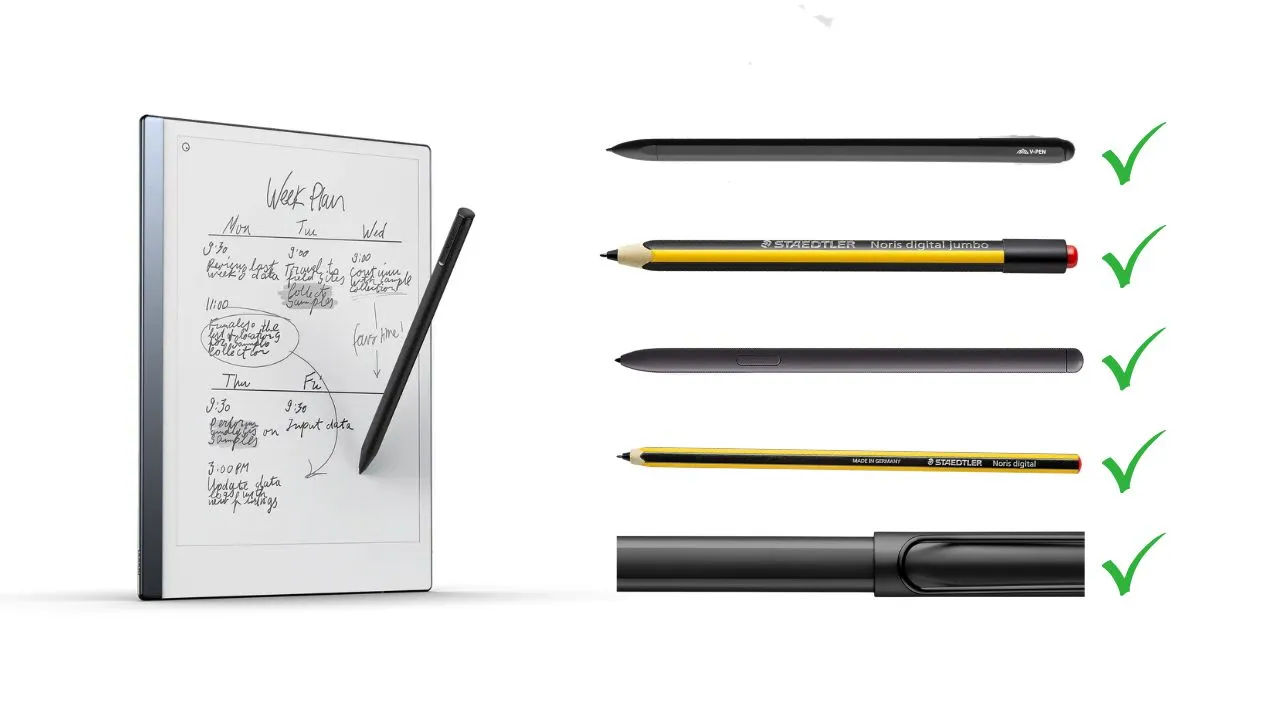
reMarkable 2 runs on Wacom EMR technology, which works with dozens of third-party styluses. You can find a solid reMarkable 2 compatible pen for $10 to $60 and feel almost no difference in day-to-day writing. This guide covers how compatibility works, which pens to avoid, and the five best reMarkable 2 compatible pens you can buy right now.
Quick Pen Comparison at a Glance
| Feature | LAMY AL-Star | V-Pen Stylus | Noris Jumbo | Noris Classic | Samsung S6 Lite |
|---|---|---|---|---|---|
| Eraser | Side Button (Hack) | Tail Eraser (Native) | Tail Eraser (Native) | None | Side Button (Hack) |
| Magnet | Yes | Yes | No | No | Yes |
| Nib swap With reMarkable 2 Marker | Yes | Yes | No | No | Yes |
| Writing feel | Thick, pen-like, premium body | Marker-like convenience | Soft, pencil-like, low effort | Light, simple, pencil style | Slim and smooth, with a bit more pressure |
| Best For | Premium writing feel | Plug-and-play eraser | Pencil-style writers | Budget Choice | Cheapest magnetic pen |
| Price | Check Price | Check Price | Check Price | Check Price | Check Price |
How Remarkable 2 Pen Compatibility Works
Before you order any stylus, you need to understand one rule: the screen technology determines what works. Get this wrong, and you’ll end up with a pen that does absolutely nothing.
Wacom EMR Technology Explained
The reMarkable 2 uses a Wacom EMR (Electromagnetic Resonance) digitizer beneath its E Ink display. EMR is a passive technology, meaning the pen carries no battery and needs no Bluetooth pairing. The screen generates a small electromagnetic field. The pen picks up that signal and converts it into precise, pressure-sensitive input.
Both passive EMR pens and active EMR pens work with the rM2. All compatible styluses deliver 4096 levels of pressure sensitivity, giving you precise control over line weight, whether you press lightly or write with a heavier hand. That leaves you with a wide range of compatible options at different price points.
What doesn’t work? AES (Active Electrostatic) pens. That rules out the Apple Pencil, the Microsoft Surface Pen, and any stylus that relies on its own battery or wireless pairing. Don’t waste time testing those.
Pens You Should Avoid
Some pens look plausible on the surface, but won’t work or will actively damage your device. Keep these off your list:
- Sony DPT pens — designed for Sony’s proprietary digitizer system, not EMR
- Supernote ceramic nib pens — the ceramic tip will scratch and damage the rM2 screen coating permanently
- HP Active Pen — AES-based and incompatible
- Google Pixelbook pen — same AES issue
- Mixoo Universal Stylus — capacitive only, won’t register any input on an EMR screen
One more trap to avoid: not every Wacom-branded pen works. Wacom makes styluses for its Intuos drawing tablets that run on a completely different protocol. Those Intuos replacement pens won’t register on the rM2 even though they carry the Wacom name. Always confirm the pen explicitly supports Wacom EMR before placing any order.
Top 5 Remarkable 2 Compatible Pens Reviewed
Each pen below uses Wacom EMR and works on the rM2. They cover different budgets and writing preferences. Here’s the breakdown.
LAMY AL-Star EMR Stylus: Best Overall

The LAMY AL-Star EMR stylus feels like a proper writing instrument the moment you pick it up. The body is anodized aluminum, with real weight and substance. It comes in different color options, the grip section is ergonomic, and the pen clip makes it easy to store without losing it in a bag. Long writing sessions don’t fatigue your hand.
The most interesting feature is nib compatibility. The LAMY AL-Star accepts official reMarkable marker tips made from compressed felt. Swap them in, and you get that signature paper-like writing feel the rM2 is known for, without paying for the official pen. The LAMY, Samsung S Pen, and Kindle Scribe premium pen all share cross-compatible nibs with the official reMarkable Marker. You can mix and match freely between any of those four pens.
The one limitation is the eraser. Out of the box, the button on the LAMY doesn’t activate eraser mode on the rM2. To unlock that function, you need to apply the ddvk stylus hack via SSH access on GitHub. It involves a few command-line options in reMarkable’s settings. If that sounds fine to you, the LAMY becomes one of the most complete pens on this list. If software tweaks aren’t your thing, the V-Pen or Staedtler Jumbo make more sense
Keep in mind that LAMY does not magnetically attach to the tablet, so you lose one of the official marker’s nicest features. Even so, it is the best overall pick because it feels premium and offers serious note-takers a body shape that more closely resembles a real pen.
V-Pen EMR Stylus: Best with Built-in Eraser

The V-Pen is the one to grab if you want an eraser that works the moment you flip the pen, no setup, no modifications, no GitHub. That alone makes it stand out from most alternatives at this price.
The unboxing experience is worth mentioning, too. The pen arrives in a premium presentation box, the kind you’d actually keep, with a nib-removal ring tool and five extra replacement tips included. That’s a meaningful add-on, since most budget EMR pens ship with one spare tip or none at all.
In the hand, the V-Pen has a solid, slightly weighted feel without crossing into fatiguing territory. The body is flat on one side and curved on the other, which naturally guides your grip during long writing sessions. The tip is soft against the rM2 screen, and with 4096 levels of pressure sensitivity, it handles everything from light annotations to heavier sketching without losing responsiveness. Because it runs on Wacom EMR technology, no battery or pairing is required. You pick it up and start writing.
It also snaps to the side of the reMarkable 2 via magnetic attachment, which keeps it from wandering off when you toss the device into a bag. That magnetic convenience is something you’ll appreciate more and more over time, especially after you’ve lost an expensive pen once or twice.
The V-Pen sits close behind the LAMY overall. If an out-of-the-box eraser is your top priority, this is your pen.
STAEDTLER Noris Digital Jumbo: Best Pencil-Feel

The Staedtler Noris Digital Jumbo is the most recommended pen among real rM2 users who tested multiple options side by side. It wears the classic yellow-and-black pencil look, with a wooden hexagonal body that puts a retro writing instrument in your hand.
The writing experience is where this pen pulls ahead. The 0.7mm nib and 4096 pressure levels produce a soft, smooth line that feels similar to writing with a fine felt-tip pen. The rM2’s slightly textured E Ink display adds just enough friction to feel genuinely paper-like, and the Staedtler nib responds beautifully to it.
The eraser on the back works natively, no hacks required. Flip it and erase. The eraser covers a wider area than a button-style eraser, which works well for clearing large sections but can feel imprecise when you only want to remove a small detail. The wider surface suits broad corrections better than precise detail edits. That is the same trade-off you get with a real pencil eraser, so it won’t surprise anyone coming from analog note-taking.
One thing to note on nibs: unlike the LAMY AL-Star, the Staedtler Jumbo uses its own proprietary nib format. It is not cross-compatible with reMarkable, LAMY, Samsung, or Kindle Scribe nibs, so you are locked into Staedtler’s own replacement tips when it comes time to swap.
The Staedtler Jumbo carries one more trade-off: no magnetic attachment. It won’t snap to the side of your rM2. You’ll need a case with a built-in pen loop to keep it close. The pen is also too wide to fit in the holder on most slim folio cases, so factor that into your setup planning.
If you love the feeling of writing with a pencil on paper, this is the one to get; nothing else in this category comes close.
STAEDTLER Noris Digital Classic: Best Budget Stylus

If you want that smooth Staedtler writing experience but want to spend less, the Noris Digital Classic gets the job done. It’s thinner and lighter than the Jumbo and skips the eraser, but its writing performance is nearly identical.
The writing experience is where this pen genuinely surprises people. The tip doesn’t feel like a typical stylus; it’s closer to pencil lead on paper than to a ballpoint or felt-tip. The pen works right out of the box on the rM2 with reliable Wacom EMR input, 4096 levels of pressure sensitivity, and zero pairing or charging required (same proprietary nib format as the Jumbo — no cross-compatibility with reMarkable or LAMY tips). You can also use the nib at a slight angle for broader strokes, which gives you a more expressive range during sketching or handwriting.
There is no physical eraser on the back. You select the erase tool on screen instead, which takes one extra tap. In practice, most people find a faster workaround: highlight the section you want to clear and delete it all at once. It is a minor adjustment, not a dealbreaker, and most heavy note-takers stop noticing it within a day or two. No magnets either. You will need a case with a pen loop to keep it close at hand.
The Classic sells out frequently. When you see it available for around $30, do not wait. It replaces the official Marker, and most people won’t notice any difference during a normal day of note-taking.
Samsung Galaxy S6 Lite Stylus: Cheapest Magnetic Pen (not original)

The Samsung S6 Lite stylus gives you magnetic attachment at the lowest price on this list. The pen snaps onto the rM2’s side with a solid hold. Multiple color options make it easy to match your setup.
The nib is slim and durable. The pen Samsung requires slightly more pressure than the Staedtler to produce a thick line, but the overall writing feel is smooth and consistent. The 4096-level pressure sensitivity handles both light sketching and heavier note-taking without any issues.
The eraser button doesn’t activate on the rM2 out of the box. Just like the LAMY, it needs the ddvk hack to work. If magnetic attachment matters more to you than a plug-and-play eraser, the Samsung S6 Lite stylus is the cheapest way to get it.
The Samsung Pen also shares nib compatibility with the LAMY AL-Star, reMarkable Marker, and Kindle Scribe Premium Pen, so you can swap in reMarkable’s compressed felt tips for a more paper-like feel.
The pen fits those who want the cheapest magnetic option that still feels good in daily note-taking. It does not beat the LAMY on body feel or the Jumbo on soft pencil texture, though it costs less than both and slips into thin cases more easily.
Nib and Tip Compatibility Guide
Choosing the right pen is only half the decision. Nibs wear down over time, and they directly affect how writing feels on the E Ink display. Here’s what you need to know before you buy.
Can You Use Official reMarkable Tips in Third-Party Pens?
Yes, you can use Official reMarkable Tips in Third-Party Pens. The official reMarkable Marker tips, made from compressed felt, fit directly into the LAMY AL-Star. They also work in the V-Pen EMR Stylus and the Samsung S6 Lite. Those four pens (LAMY, V-Pen EMR Stylus, Samsung S6 Lite, and official reMarkable Marker) share fully cross-compatible nibs.
If you love the feel of reMarkable’s compressed felt nibs, you don’t need to buy the official Marker to get them. Grab the LAMY AL-Star and swap in reMarkable tips. You get the writing feel while saving money on the pen body.
Kindle Scribe nibs offer another budget-friendly path. They use a similar compressed felt material to reMarkable’s tips, fit into all four cross-compatible pens, and cost less per pack than official reMarkable replacements.
The Staedtler Noris Jumbo and Classic are a different story. Staedtler uses a thinner nib format that doesn’t cross-match with any of the other pens on this list. You can’t put a reMarkable nib into a Staedtler, and Staedtler nibs don’t sit securely in LAMY or Samsung pens. Buy the correct replacement nibs for whichever pen you choose, and don’t mix formats.
How Often Should You Replace Nibs?
It depends on how much you write and which nib material you use. Graphite-style nibs wear down fast. Heavy writers may go through them in a few weeks, especially on the rM2’s textured screen. POM (polyoxymethylene) plastic nibs, like those that ship with the LAMY, last considerably longer under the same conditions.
The rM2’s paper-like texture makes writing feel so satisfying, but it also causes nib wear. More pressure means faster wear. Keep a backup pack of nibs at your desk so you’re never caught mid-project with a worn-down tip.
One warning: Avoid titanium or metal aftermarket nibs unless you’ve researched them carefully. Metal tips can scratch the screen coating over time, particularly with heavy pressure, and that damage is permanent.
Buying Guide: What to Think About Before You Buy
Five good options create a real decision. Here’s how to cut through it quickly. Let’s break it down by the four factors that actually matter.
Do you want an eraser that works immediately?
The V-Pen and Staedtler Noris Jumbo both include physical erasers that work on the rM2 with no setup. If you’re open to applying the ddvk SSH hack, the LAMY AL-Star and Samsung S6 Lite also support the eraser function after modification.
Does magnetic attachment matter to you?
If you want your pen to snap onto the side of the rM2 like the official Marker, choose the LAMY AL-Star, V-Pen, or Samsung S6 Lite. All three include magnets. The Staedtler Jumbo and Classic don’t, so plan for a case with a pen loop or a dedicated pen holder.
What’s your budget?
- Under $10: Samsung S6 Lite Stylus Pen (not original)
- Under $40: Staedtler Noris Classic
- Under $50: Staedtler Noris Jumbo
- Up to $60: LAMY AL-Star or V-Pen
What’s your writing style?
Sketching and illustration reward the LAMY AL-Star’s precision and nib flexibility. Pure note-taking works well with any of these five pens. If you grew up writing with a real pencil and that tactile memory matters, the Staedtler Jumbo will feel immediately natural.
Final Thoughts on Pen Alternatives
Finding a reMarkable 2 compatible pen is easy once you know what to look for.
If you want a premium, heavy feel, go with the LAMY AL-Star. For a simple pencil experience, grab the Staedtler Noris Jumbo. If you just want a cheap backup that sticks to the tablet, the Samsung S6 Lite pen is your best bet.
Just remember to keep a few spare nibs in your bag. Nothing stops a productive note-taking session faster than a worn-out tip. Explore these options and find the one that fits your hand and your budget perfectly.
Frequently Asked Questions (FAQs)
Most third-party EMR pens are safe, but you must avoid ceramic nibs (like those from Supernote) and metal/titanium tips. Ceramic and metal are harder than the reMarkable’s screen coating and will cause permanent scratches over time. Stick to POM plastic or compressed-felt nibs to keep your screen in perfect condition.
Yes, the Kindle Scribe Premium Pen is fully compatible and shares the same Wacom EMR technology as the reMarkable 2. It features a functional eraser and can even use official reMarkable felt nibs. It is highly recommended as a high-quality alternative.
No, neither the Apple Pencil nor the Microsoft Surface Pen is compatible with the reMarkable 2. These styluses use Active Electrostatic (AES) or Bluetooth technology, which the tablet’s screen cannot detect. To function, a stylus must use Wacom EMR technology, which powers the pen via an electromagnetic field without batteries.
If your stylus isn’t working, it’s likely not EMR-compatible. Other causes include a worn nib or using an AES/capacitive stylus.
Quick checks:
Confirm EMR support
Replace the nib
Try another compatible pen
Not all Wacom pens are compatible. Only Wacom EMR styluses work. Pens made for Wacom Intuos or other proprietary systems won’t be recognized by the device. Look for “EMR” specifically, not just “Wacom.”
No reMarkable changed the pen technology for the Paper Pro and reMarkable Paper Pro Move, so pens compatible with the rM2 are not compatible with the Paper Pro models.
Recommended Reading
6 Things You Need to Know About Your Kindle Scribe Pen
Already know that the Kindle Scribe Premium Pen shares cross-compatible nibs with your reMarkable 2 stylus? This guide goes deeper into how the Scribe pen actually performs in terms of pressure sensitivity, eraser behavior, and nib wear, giving you useful context for comparing it against the alternatives covered above.
20 reMarkable Tips & Tricks Every reMarkable Owner Should Know
Getting your pen sorted is just the start. This guide covers the settings, gestures, and lesser-known features that make the reMarkable 2 significantly more useful day-to-day, including shortcuts that pair well with whichever stylus you just chose, from quick erasing to template customization and beyond.