Kindle Colorsoft 2025 vs Signature Edition: Which Is Worth Your Money?
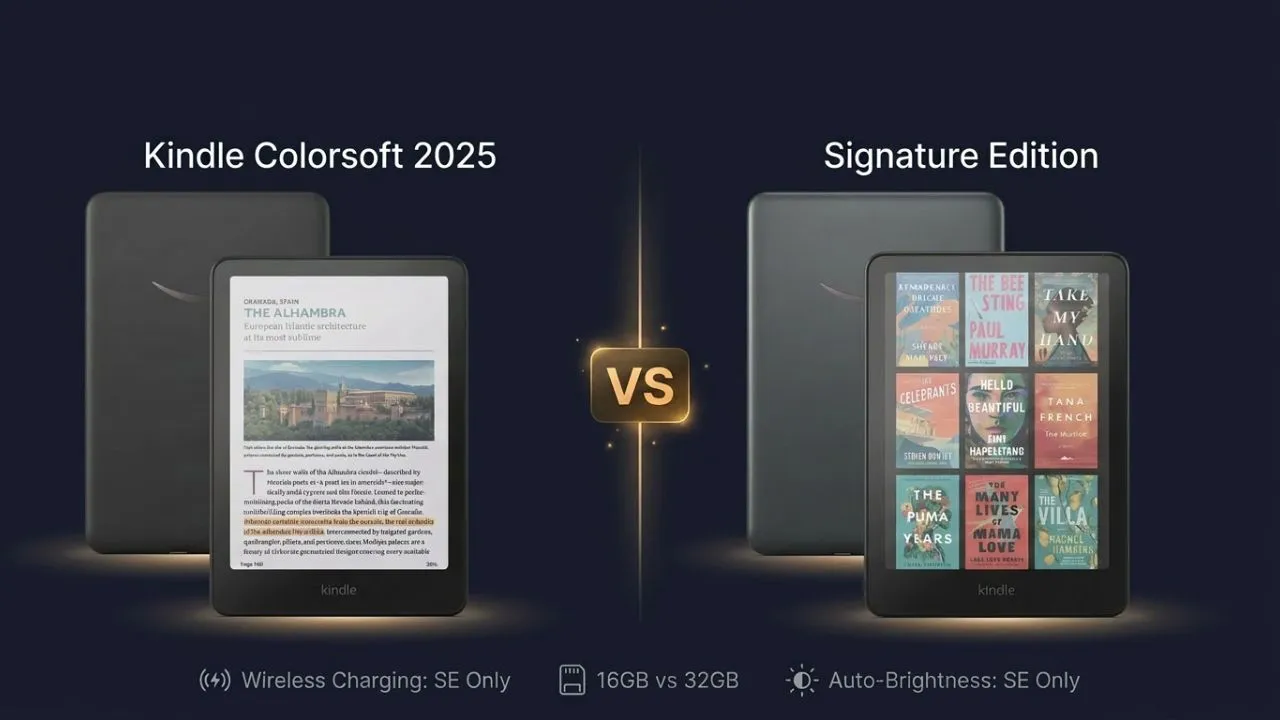
Amazon’s color e-reader lineup finally gives readers two real choices. The Kindle Colorsoft 2025 (base model) and the Kindle Colorsoft Signature Edition share the same 7-inch Colorsoft display, but a $30 gap separates them. Let’s break down exactly what you get for that extra money.
What Is the Kindle Colorsoft 2025?
The Kindle Colorsoft 2025 is Amazon’s entry point into color e-reading. It ships with 16GB of storage, a 7-inch color E Ink display, USB-C charging, and a price tag of $249.99. What it does not include: wireless charging and an auto-brightness sensor. Those two features are exclusive to the Signature Edition. If you mostly read fiction or news and want color without spending a lot, this model is a good starting point.
What Is the Kindle Colorsoft Signature Edition?
The Signature Edition launched first, back in October 2024, as the only Colorsoft available in the US market. Amazon refreshed it in 2025 with a slightly lighter body and more recycled materials. At $279.99, it comes with 32GB of storage, adds wireless Qi charging, and includes an ambient light sensor that automatically adjusts screen brightness. Think of it as the Colorsoft built for people who want fewer compromises.
Kindle Colorsoft 2025 vs Signature Edition: Specs at a Glance
| Feature | Colorsoft 2025 (16 GB) | Colorsoft Signature Edition |
|---|---|---|
| Price | Check Price | Check Price |
| Storage | 16GB | 32GB |
| Weight | 215g (7.6 oz) | 218g (7.7 oz) |
| Wireless Charging | No | Yes (Qi) |
| Auto-Brightness | No | Yes |
| Waterproof Rating | IPX8 | IPX8 |
| Color Range | 4,096+ colors | 4,096+ colors |
| Display | 7-inch E Ink Kaleido 3 | 7-inch E Ink Kaleido 3 |
Display Quality: Can You Tell the Difference?
E Ink Kaleido 3: How Color Works on Both Models
Both the base model and the Signature Edition use the exact same 7-inch E Ink Kaleido 3 panel. You get 300 PPI for black-and-white text and 150 PPI for color content. Color saturation on E Ink always looks muted without the front light turned on. That’s not a flaw specific to either device. It’s how color e-paper works. Turn the light on, and the colors come alive in a warm, readable way.
Standard vs Vivid Color Modes
Both devices offer two color display modes: Standard and Vivid. Vivid mode bumps the saturation a bit, making oranges look more orange and reds appear deeper. The difference between the two modes is not dramatic. It reads more like a mild color boost than a full contrast shift. Comic readers and manga fans will notice it more than people who read plain text.
Brightness and Front Light Differences
Here is where the Signature Edition pulls ahead. The Signature includes 12 white LEDs and 13 amber LEDs, plus an ambient light sensor that auto-adjusts brightness based on your surroundings. The base Colorsoft 2025 gives you manual-only control. You set the brightness yourself and leave it there. Both models support warm and cool light tuning. For bedside reading in changing light, the auto-brightness on the Signature is a genuine convenience.
Storage and Content Capacity
16GB vs 32GB: How Many Books Is That?
Sixteen gigabytes hold thousands of standard eBooks. If you read novels, non-fiction, and the occasional PDF, 16GB fits your needs without any strain. The math changes when you add color-heavy content. A single Audible audiobook can eat 100 to 500 MB. A graphic novel collection can chew through gigabytes fast. That’s when 32GB starts making practical sense.
No Expandable Storage: Why It Matters
Neither device has a microSD slot. The storage you buy at checkout is the storage you own forever. That makes this decision permanent. If you’re a light reader today but plan to load audiobooks or manga collections down the road, buying the 16GB base model now means you won’t be able to upgrade later without buying a new device.
Audiobooks and Graphic Novels
The Signature Edition’s 32GB becomes a real advantage for anyone who listens to audiobooks over Bluetooth or reads color comics. Both devices support Audible over Bluetooth and can handle manga. About 7GB of the 32GB gets reserved by the operating system, leaving you roughly 24GB of usable space. On the 16GB base model, usable space is closer to 9-10GB after the OS takes its share.
Charging and Battery Life
Wireless Charging: Signature Only
The Signature Edition supports Qi wireless charging. You set it on a compatible charging pad, and it draws power without plugging anything in. Wireless charging is more about habit and convenience than necessity. If you already use a wireless charging pad on your nightstand, the Signature Edition fits right into that routine.
USB-C on Both Models
Both devices charge via USB-C and include a USB-C cable in the box. Neither ships with a power adapter. Amazon recommends a 9W USB adapter to reach full charging speed. Using a slower charger still works, but it adds time. The base model charges in under 2.5 hours via USB-C at the right wattage.
Battery Life: How Long Do They Last?
Both models carry an identical battery rating: up to 8 weeks per charge, based on 30 minutes of daily reading with the wireless off and brightness set at 13. Real-world testing puts the number closer to 57 days with typical use. The Signature Edition’s auto-brightness feature can extend practical battery life by keeping the light lower than a reader might set manually. Neither device will leave you hunting for a charger mid-book.
Design, Build, and Sustainability
Weight and Ergonomics
The base Colorsoft 2025 weighs 215g (7.6oz). The Signature Edition weighs 218g (7.7oz) in its revised 2025 form, down 1g from the original 2024 launch weight. Both share the exact same physical dimensions: 5 x 7 x 0.3 inches. Neither model includes physical page-turn buttons. Everything runs through the touchscreen. The 4g weight difference between models is not something you’ll notice in your hand.
Waterproofing: IPX8 on Both
Both the Colorsoft 2025 and the Signature Edition carry an IPX8 waterproof rating. That means both survive submersion in 2 meters of fresh water for up to 60 minutes. Pool readers and bath-time readers get the same protection regardless of which model they choose. Just keep it away from saltwater, which carries a lower tolerance.
Recycled Materials and Build Quality
The 2025 Signature Edition uses 28% recycled materials in its construction, up from 18% in the original 2024 version. The battery uses 100% recycled cobalt. Amazon also moved the wireless charging coils slightly, which fixed compatibility issues that some third-party charging pads had with the 2024 model. The back panel on the 2025 revision also has text printed on it, which makes it easy to tell the two generations apart when buying secondhand.
Kindle Ecosystem and Long-Term Ownership
Kindle Unlimited, Prime Reading, and Audible
Both models tap into the exact same Amazon content ecosystem. Kindle Unlimited, Prime Reading, Audible audiobooks, and personal document uploads all work the same way on both devices. The hardware choice does not affect what content you can access. Audible audiobooks stream over Bluetooth on both models, connecting to any headphones or speaker you already own.
Software Updates and the 2024 vs 2025 Difference
Both the base model and the Signature Edition run the same Kindle firmware and receive the same software updates. The differences between the 2024 and 2025 Signature Edition are hardware-only: recycled materials, repositioned charging coils, a lighter build, and a corrected display. The earlier batch of Signature Edition had a yellow banding issue that the 2025 revision fixed entirely.
If you shop secondhand for the Signature Edition, look for “All New” in the Amazon listing title, or check that the UPC on the box ends in 7439. The 2025 revision has FCC information printed directly on the back panel, which the 2024 model lacks.
Accessories: Cases, Docks, and Chargers
Amazon makes a fabric cover for the Colorsoft lineup, and third-party case makers offer leather and polycarbonate options. Both models share the same physical dimensions, so most cases fit either device.
The Signature Edition benefits from a wireless charging dock, either Amazon’s official version or any Qi-compatible pad. You place it down flat, and it starts charging without you thinking about it. The base model owner simply uses the USB-C cable from the box.
Price and Value Analysis
The Kindle Colorsoft 16GB retails for $249.99, while the Signature Edition sells for $279.99. That leaves a $30 gap based on Amazon’s official pricing.
For that extra $30, you get three things: 32GB instead of 16GB, wireless charging, and an auto-adjusting front light. That is a clear upgrade bundle, and Amazon kept the price jump small enough that many regular readers will feel tempted.
Still, the better value depends on how you read. If you mostly read text-heavy books and charge with a cable anyway, the 16GB Colorsoft offers a similar reading experience for less money. If you read comics, save lots of downloads, use Audible, or want a more premium bedside reader, the Signature Edition gives you a better fit.
It is also worth watching the sale periods. During Prime Day, the Signature Edition nearly closes the gap with the base model entirely. If you can time your purchase around Amazon’s major sale events, the upgrade decision gets much easier.
Who Should Buy Which Model?
Best for Casual Readers: Colorsoft 2025 Base
You read novels, memoirs, and long nonfiction. You charge your devices when you sit down at a desk. You do not listen to audiobooks on your Kindle, nor do you read manga or graphic novels.
Buy the base model. The display is the same. The reading experience is the same. You save $30 and get everything that matters.
Best for Power Readers and Collectors: Signature Edition
You have a Kindle Unlimited subscription and rotate through dozens of books a month. You read manga or comics on the device. You stream Audible books over Bluetooth while commuting. You want to drop the Kindle on a wireless pad at night without hunting for a cable.
Buy the Signature Edition. The 32GB storage gives you room to build a real library on-device, the wireless charging earns its keep over years of nightly use, and the auto-brightness sensor keeps the screen comfortable across changing light conditions.
Kids, Students, and Gift Buyers
Both models handle waterproofing well, so neither will die from a spilled water bottle in a backpack. For a student who reads textbooks or PDFs, the 32GB Signature Edition offers more storage space for large files and downloaded documents. For a gift to a casual reader who mostly reads fiction, the base model is an easier ask. It does the job without the premium price tag.
When Neither Colorsoft Makes Sense
If you read only black-and-white novels and care most about text contrast, a Kindle Paperwhite still makes more sense than either Colorsoft model. The color display adds real value for covers, comics, and illustrated content, but it does not beat a dedicated black-and-white Kindle for pure text comfort.
Final Verdict
The Kindle Colorsoft 2025 vs. Signature Edition debate comes down to one thing: whether the three premium features are worth $30 to you.
Because both models share the same screen, body size, waterproof rating, battery claim, and software, the cheaper 16GB model gives most readers nearly the full Colorsoft experience for less money.
Pay for the Signature Edition if you want 32GB, wireless charging, and an auto-adjusting front light, and you know you will use all three. Skip the upgrade if you mostly read regular ebooks and charge with a cable anyway.
Our pick for most buyers is the Kindle Colorsoft 16GB. For comic readers, Audible-heavy users, and nightstand readers, the Signature Edition is the right call.
Recommended Reading
The Ultimate Guide to Kindle Storage: 8 GB vs. 16 GB vs. 32 GB
The storage decision between the Colorsoft models doesn’t end at checkout. This guide breaks down exactly how much space different content types consume, from novels and PDFs to audiobooks and graphic novels, helping you calculate whether 16GB genuinely covers your reading habits or whether 32GB is the smarter long-term investment.
Can You Read Manga On Kindle? [Everything You Need to Know]
Color display and storage capacity matter most when you’re reading manga, exactly where the two Colorsoft models diverge most sharply. This guide covers manga formatting, file compatibility, and how the Kindle handles panel-by-panel reading, giving comic and manga readers the details they need before committing to either model.