Boox Go 6 Gen II Review: Pocket E-Reader Meets Stylus Notepad
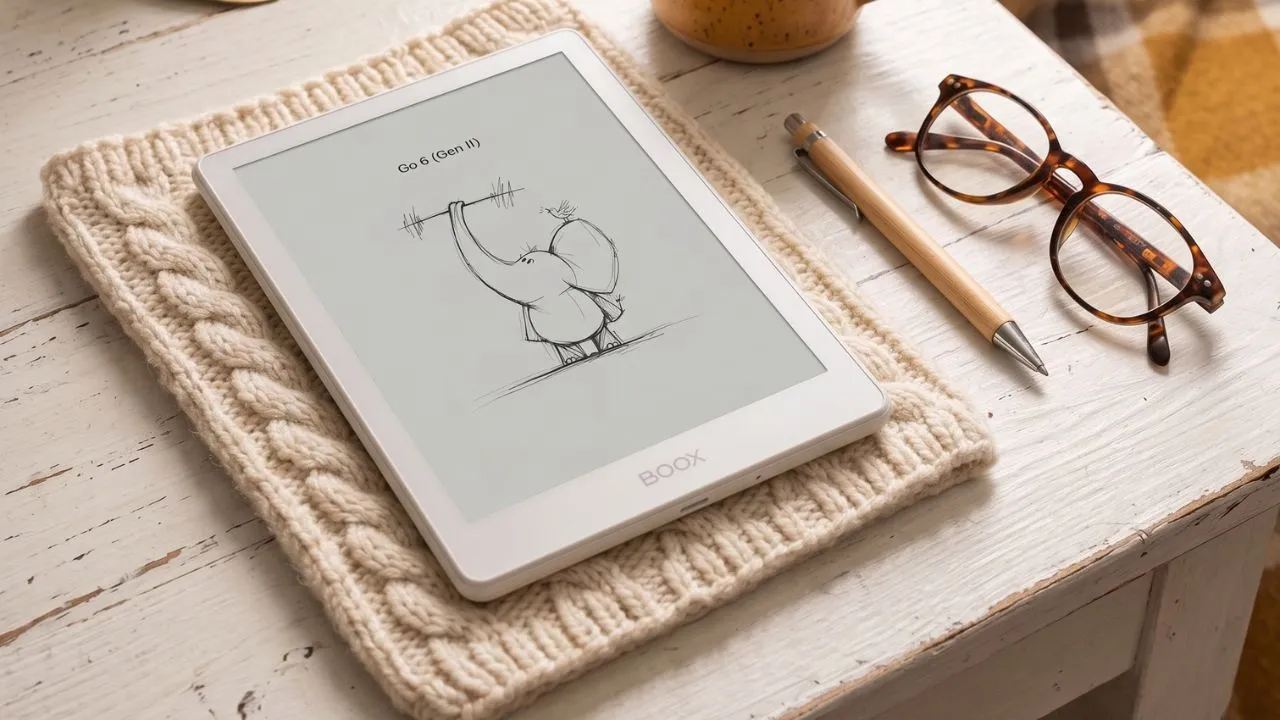
The Boox Go 6 Gen II brings pen input to a tiny Android e-reader without turning it into a bulky tablet. It reads books well, handles PDFs better than most six-inch readers, and provides a useful space for quick handwritten notes.
The catch sits right beside its appeal. Boox lists the reader at $199.99, sells the InkSense Plus stylus separately, and runs Android 11 on the new device. Still, readers who want Kindle, Kobo, Libby, personal files, and handwritten notes in one small device will find a lot to like.
It does not try to replace an iPad or a 10-inch e-ink notebook. It aims to handle books, articles, PDFs, library loans, and short handwritten notes in a device that you can carry almost anywhere.
Quick Specs and What’s in the Box
The Go 6 Gen II runs on a Snapdragon 665 chip paired with 3GB of RAM, up from 2GB on the original Go 6. That RAM bump matters more than the number suggests, since the extra gig makes page turns, app switching, and menu navigation feel noticeably snappier.
| Spec | Detail |
|---|---|
| Display | 6-inch E Ink panel, 300 PPI, matte finish |
| Chipset | Snapdragon 665, octa-core, 2.02GHz |
| RAM | 3GB shop.boox+1 |
| Storage | 32GB internal (about 22GB usable after Android), microSD expansion |
| OS | Android 11 with full Google Play Store |
| Stylus | InkSense Plus capacitive pen (sold separately) |
| Weight | 160 grams |
| Thickness | Roughly 6.8mm to 7mm |
| Connectivity | Wi-Fi and Bluetooth 5.0 only, no cellular |
| Price | Check Price |
The box includes the reader and a USB-C charging cable. Boox sells the stylus, official covers, and screen protectors as separate purchases, so budget extra if you want the full setup.
Storage looks generous on paper at 32GB, but the operating system alone eats close to 10GB, leaving you with a little over 20GB for books and apps. That’s still plenty for hundreds of graphic novels or thousands of regular ebooks, and the microSD slot covers you if you need more.
Design, Build Quality, and Ergonomics
The Go 6 Gen II retains the same compact six-inch shape that made the original model such an easy grab-and-go reader. Boox rounded off the corners and edges this time, and that small change makes the device feel noticeably nicer in the hand than the sharper first-gen design.
At just 160 grams and under 7mm thick, this reader disappears into a jacket pocket or even a fairly tight trouser pocket, as long as you’re not already carrying a phone and wallet in the same spot. You can comfortably hold it for hours while reading in bed or lounging by a pool.
Shell, Stone, and New Colorways
Boox sells the Go 6 Gen II in Shell, Stone, Custard, and a darker Plum finish that reads almost black with a subtle blue tint under light. The back panel now has a textured, slightly bumpy finish. You will love the grip and the premium feel; it picks up smudges fast and needs regular wiping.
The front glass sits noticeably recessed compared to the flush design on the first-generation Go 6, and that sunken look might bother some people even though it doesn’t affect actual reading or writing. Boox also swapped the scratch-resistant coating from the first generation for a paper-textured layer that feels better under the pen but scratches more easily.
One Frustrating Oversight
Boox left out any stylus silo or magnetic mount for the pen, on both the device and the official cover. That means you either carry the stylus loose in your bag or buy a third-party adhesive pen loop to stick inside your cover.
The storage problem gets worse when you consider how the pen actually works. The InkSense Plus doesn’t use Wacom EMR technology, so it can’t draw power passively from the tablet as many rival styluses do; instead, it charges over its own USB-C cable and needs its own battery. That means losing track of a loose pen isn’t just inconvenient; it also means remembering to keep it charged separately. You can half of this problem with cheap pen loops, but it should not be a workaround you need to hunt down after spending $200 on a reader.
Display Quality: Reading in the Real World
Text on the Go 6 Gen II looks sharp thanks to the 300 PPI resolution, and contrast stays strong for a small monochrome panel. Where things get murky is the exact panel technology. The original Go 6 product page listed E Ink Carta 1300, considered one of the best panels available for contrast and readability, and the Gen II listing on shop.boox.com drops that specific label in favor of generic ‘HD ePaper’ phrasing. That said, Boox’s other certified channels, including Instagram and Facebook, along with several third-party retailers, still describe the Gen II as a Carta 1300 panel, suggesting the underlying technology likely hasn’t changed and that this is more of a labeling inconsistency on one page than a genuine spec downgrade.
However, independent testing adds a bit more nuance to the story. The L-star lightness value of roughly 65 to 66 on the Gen II compared to 66 to 67 on the original Go 6, meaning the background reads very slightly darker. That gap is small enough that it’s hard to spot with the naked eye during regular reading, but it does make the display story less transparent than buyers would probably like.
The dual-tone front light lets you shift between cool and warm tones for daytime or nighttime sessions, and it stays even across the panel at most brightness levels. At the maximum setting of around 230 nits, a slight brightness gradient appears from top to bottom, though it fades once you drop to a more reasonable level. The lowest setting dims to about 0.15 nits for comfortable reading in a dark room. Ghosting, where faint traces of the previous screen linger after a page turn, stays well controlled most of the time, though it can pop up occasionally depending on what app you’re running.
Since this panel is strictly black-and-white, color comics and magazines won’t look their best here. For novels, black-and-white manga, and dense documents, the contrast holds up well enough that most readers won’t miss color at all.
Note-Taking: The New Stylus Tested
Pen support is the headline addition on this generation, and it works through the optional InkSense Plus stylus, a metal pen with real heft and a side button for quick erasing. Because it’s capacitive rather than EMR, the pen needs its own USB-C charge, separate from the device itself.
Pressure sensitivity works, but it’s noticeably softer than an EMR pen, and users coming from Wacom-style pens will feel the gap right away. Latency measured around 19 milliseconds in independent testing, a number that would have topped the charts two years ago and still counts as a genuinely good result for a device this small. Writing feels responsive in daily use and is comparable to the reMarkable Paper Pure, despite the size difference.
The built-in notes app gives you multiple pen types, layers, templates, shape tools, audio recording, and an outline tool that builds a table of contents you can export straight into a PDF. That’s a genuinely complete note-taking system for such a small screen, even though six inches gets cramped fast for anything beyond quick jots, calendar memos, or margin notes. The official pen alongside a matte screen protector will give you “a dream team” for everyday note-taking, though the glide never fully mimics paper.
Pen accuracy actually beats what Boox’s larger Go 7 offers with its older InkSense stylus, and the Go 6 Gen II handles tight letter curves like M, N, and W a little more cleanly. Don’t expect this to replace a full notebook tablet like the Boox Note Air or a Kindle Scribe. This is a scratch pad, not a sketchbook, and freeform drawing or long-form journaling still feels tight on this screen. If you exported notes from the Go 6 to a larger 13.3-inch Boox Note Max, you would find that the handwriting looked “ridiculously” oversized and childlike once blown up on the bigger screen, which highlights just how cramped that writing space really is.
Stylus Compatibility Notes
The Go 6 Gen II works only with the bundled or officially compatible capacitive pen, and it does not support Wacom EMR styli at all. If you’re coming from a Wacom-based tablet, expect a different, less paper-like writing feel here, though adding a matte screen protector closes that gap considerably and gives the pen more resistance against the glass.
Open Android: Freedom and Its Trade-Offs
What Open Android Unlocks
Installing Kindle, Kobo, and Libby side by side on a single device is the real payoff of the Go 6 Gen II running full Android 11 with Google Play Store access, since it frees you from choosing a single ecosystem. Boox’s built-in store only offers public-domain classics, so anyone hoping for a real bookstore experience will need to bring their own apps.
Android 11 in 2026 — Should You Care?
Android 11 is genuinely old for a device launching in 2026, and has fair concerns about long-term security patches and app compatibility. However, most popular reading apps still target Android 7 through 10, so day-to-day reading shouldn’t hit walls anytime soon, but anything requiring newer security features probably won’t run. That gap looks even more pronounced next to Boox’s own product line, since the newer Go Color 7 ships with 4GB of RAM and Android 14, making the Go 6 Gen II’s 3GB and Android 11 feel dated by comparison, the moment you shop the wider Boox catalog.
UI Responsiveness
The extra gigabyte of RAM makes a real difference. If you run speed comparisons against Boox’s pricier siblings, you’ll find the Go 6 Gen II felt surprisingly snappy despite carrying an older Snapdragon 665 chip. Though occasional lag still shows up compared to devices running the newer 750G.
The E Ink Wise control center lets you adjust screen refresh speed app by app, which turns out to matter more than it sounds on paper. You can set a web browser to fast refresh mode so scrolling and page loads feel closer to a normal tablet, while keeping the Kindle app in a high-quality, slower-refresh mode that keeps static text looking crisp and free of ghosting.
Cloud sync
Cloud sync works with Google Drive, Dropbox, OneDrive, WebDAV, and Evernote, and sends note backups to servers in the EU, the US, or China, depending on your location. Given the security risks of using an old, unpatched OS, it’s worth taking a closer look at the regional server routing, and those concerned about privacy might want to check Boox’s data policy before syncing sensitive notes.
PDFs Work Better Than Expected
Boox has long handled PDFs better than most e-readers, and the Go 6 Gen II keeps that strength. The small screen still limits what you can do, but Boox’s tools make occasional PDF reading more workable.[
Column mode stands out. It zooms into a section of a page, then moves through each column or segment in order. You spend less time pinching and dragging around a dense page.
This feature helps with research papers, reports, manuals, and multi-column articles. It also gives the Go 6 Gen II an edge over the Palma line, which lacks the same PDF viewing options.
Do not expect miracles. Six inches feels cramped for A4 pages, textbooks, graphic novels, large tables, spreadsheets, and detailed forms.
You can read a short report on a train or mark up a contract before a meeting. If you read PDFs for hours each day, choose a 10.3-inch or 13.3-inch e-ink tablet instead.
Controls, Connectivity, and Audio Support
The Go 6 Gen II supports Bluetooth 5.0, so you can use wireless headphones for Audible, text-to-speech, music, or podcasts. It does not include built-in speakers.
The reader relies on touch controls. Apart from the power button, it has no physical page-turn buttons.
That will disappoint readers who like tactile page turns. The touchscreen works well enough, but swipe gestures can feel fussy if you do not tap the right part of the display.
The reader also uses Wi-Fi only. You cannot add a SIM card for mobile data, so downloading books, syncing notes, and using cloud services requires Wi-Fi.
Battery Life: The Weak Spot
The Go 6 Gen II carries the same 1,500mAh battery as its predecessor, and that capacity shows its limits in real use. Pure reading with the front light off nets around 16 hours per charge, while active note-taking with the stylus drops that down to roughly 6 hours. Browsing the web or running heavier apps like Chrome can cut battery life to just 3 to 4 hours, so treat this more like a tablet than a classic e-reader once you start using Android apps heavily.
Original Go 6 actually managed slightly better runtimes, making battery life the clearest regression on this new model. The new stylus layer and the extra gigabyte of RAM both draw more power than the previous generation, which helps explain why Gen II runs down faster, even though it shares the same battery capacity. You are essentially trading a bit of battery life for pen support and a snappier interface, a trade that fits the pattern seen across the rest of this refresh.
If you push the device hard, whether using heavy browsing, extended note-taking, or running multiple Android apps, plan to pack a USB-C charger, especially on longer trips. The battery life doesn’t ruin the experience, but it does mean establishing realistic expectations for what is, at its core, a tiny Android tablet rather than a dedicated e-reader.
Gen I vs. Gen II: Is the Upgrade Worth It?
The jump from Gen I to Gen II comes down to three real changes: an extra gigabyte of RAM, four new colorways, and brand-new stylus support that the first Go 6 never had.
| Feature | Boox Go 6 (Gen I) | Boox Go 6 Gen II |
|---|---|---|
| RAM | 2GB | 3GB |
| Stylus support | None | InkSense Plus capacitive pen |
| Colors | Standard black | Shell, Stone, Plum, Custard |
| Back panel | Smooth, sharper edges | Textured, rounded edges |
| Battery runtime | Slightly longer | Slightly shorter |
If you already own a Gen I and want to start annotating books or jotting quick notes, the upgrade makes sense since pen support is the entire point of this refresh. If you’re a pure reader who never touches a stylus and your Gen I still works fine, hold onto it and save the money.
Boox Go 6 Gen II vs. the Competition
vs. Kindle Paperwhite
Against a Kindle Paperwhite, the split comes down to simplicity versus flexibility. Kindle keeps things locked into one clean store and interface. At the same time, the Go 6 Gen II opens the door to running Kindle, Kobo, and Libby together on the same device with a stylus thrown in, directly extending the ecosystem freedom.
vs. Boox Go 7
Against Boox’s own Go 7, the larger sibling carries an older, less accurate version of the InkSense stylus, and the smaller Go 6 Gen II actually handles tight pen curves better despite its size disadvantage. The Go 7 trades away pocketability for a larger writing surface, so the right pick depends on whether portability or drawing space matters more to you.
vs. Kobo Clara
The Kobo Clara is designed for dedicated readers, with a great screen and a straightforward bookstore experience, but it doesn’t allow any Android app installations. The Boox Go 6 Gen II packs more power; you can read your Kobo books on it, though Kindle books won’t work on the Kobo. The Boox is ideal for those who want flexibility and digital sticky notes, while the Kobo offers a simpler, more streamlined reading setup right from the start.
vs. reMarkable Paper Pro Move
Compared to the reMarkable Paper Pro Move, the Move’s taller design feels stuck in an awkward middle ground, too big for a pocket but not roomy enough to replace a real notebook. The Go 6 Gen II hits a sweeter spot: smaller, truly pocketable, and still handy for quick notes, even without a built-in pen holder.
Pros, Cons, and Verdict
Pros
- Crisp 300 PPI display with strong contrast for text and black-and-white comics
- Lightweight 160g body that disappears into a pocket or small bag
- Full Google Play access for Kindle, Kobo, Libby, and other reading apps side by side
- Strong PDF handling for a six-inch reader, including useful column-zoom viewing modes
- Responsive InkSense Plus stylus with genuinely good latency for quick notes and margin annotations
- microSD expansion for large book and comic collections
Cons
- No built-in stylus silo or magnetic mount on the device or official cover
- Stylus is capacitive, not EMR, so it needs its own separate USB-C charge.
- Android 11 already feels dated, raising long-term questions about app compatibility and protection.
- Battery life takes a real hit compared to the first-generation Go 6
Who It’s For
Commuters, students, and travelers who want a single lightweight device for reading across Kindle, Kobo, and Libby while jotting quick margin notes will get real value here. It also fits readers who want freedom from a locked-down ecosystem, or anyone switching away from a single-brand device.
Who Should Look Elsewhere
Dedicated journal writers, Color e-ink fans, and anyone needing guaranteed long-term app support should look at other options. If you only read novels and want long battery life with no settings to manage, a Kindle Paperwhite or Kobo Clara BW will feel simpler and last longer between charges.
At around $190 to $200, the Boox Go 6 Gen II earns its place because it does more than read. Its small screen sets firm limits, yet its open Android setup, sharp display, strong file support, and surprisingly capable pen response make it one of the most interesting compact e-readers available, as long as you go in knowing exactly where its limits sit.
Recommended Reading
5 Best Small E-Readers That Fit Right in Your Pocket
If the Go 6 Gen II’s compact, pocket-friendly form factor is what caught your attention, this roundup puts it in context against other tiny e-readers on the market. It’s a useful next stop for weighing screen size, portability, and battery life before committing to a six-inch device.
14 Boox Palma Tips and Tricks: Master Your E-Ink Device
Already own or considering another Boox device? This guide unpacks how to get the most out of the Palma, a similarly compact Android e-ink reader from the same brand. It’s packed with setup shortcuts and customization tricks that translate well to the Go 6 Gen II’s shared Boox software.