Xteink X4 Pro Review: Is This Tiny E-Reader Worth It?
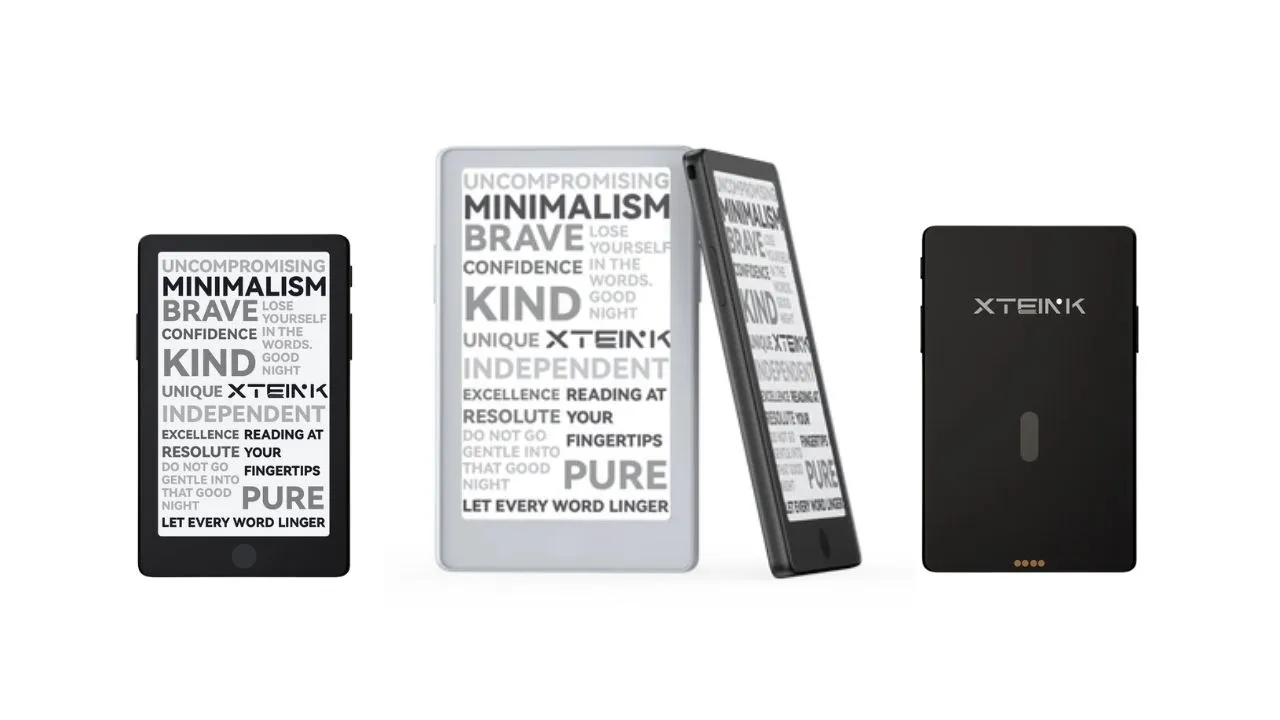
If you have been scrolling through e-reader forums lately, you have probably seen the Xteink X4 Pro pop up everywhere. Xteink X4 Pro is the pro version of the Xteink X4. This tiny, credit-card-sized device promises the front light people wanted on the original X4, but it also changes some things you might not expect.
This device targets minimalist readers, commuters, and anyone trying to cut down on phone screen time. You do not get apps or notifications here. You get books, and that is the whole point.
Let’s break down exactly what changed, what got worse, and whether it earns a spot in your pocket.
Disclosure: This post contains affiliate links for XTEINK’s Affiliate+ campaign. I may earn a commission on qualifying purchases made through these links, at no extra cost to you.
Xteink X4 Pro vs X4 Classic vs X3
To see how the Pro evolves the lineup, here is how it stacks up against the X4 Classic and the ultralight X3 side by side:
| Specification | Xteink X4 Pro | X4 Classic | X3 |
|---|---|---|---|
| Screen Size | 4.3″ E-Ink | 4.3″ E-Ink | 3.7″ E-Ink |
| PPI | 219 PPI | 219 PPI | 259 PPI |
| Frontlight | Yes | No | No |
| Touchscreen | Yes | No | No |
| Battery | 1100 mAh | 920 mAh | 650 mAh |
| Weight | 72 g | 68 g | 58 g |
| Dimensions | 111 × 69 × 5.95 mm | 114 × 69 × 4.9 mm | 98 × 64 × 5.1 mm |
| Charging | Magnetic pogo + dongle | Pogo Pin | Magnetic pogo |
| Navigation Buttons | Side buttons only (No front buttons) | Front buttons | Front buttons |
| Price | Check Price | Check Price | Check Price |
With the spec landscape clear, let’s look at how these changes play out in everyday use, starting with the hardware.
Design and Build Quality
You will notice right away that the X4 Pro keeps the same pocket-friendly footprint that made the original X4 popular. The X4 Pro retains the original X4’s credit-card-inspired form factor, measuring 111 × 69 × 5.95 mm and weighing only 72 g. Despite adding a touchscreen and an adjustable front light, it remains slim enough to slip into a jacket pocket, a compact wallet, or a small bag without feeling like another device to carry.
The build quality feels solid in hand, and the device feels slightly more premium than the base X4 despite similar materials. Its matte finish helps reduce visible fingerprints, while the compact dimensions make one-handed reading comfortable for short sessions, commuting, or quick breaks between classes and work. The trade-off is visual. The black bezel can make page margins feel a little tighter than they would with a lighter-coloured frame.
Xteink has also redesigned the controls. The X4 Pro removes the original X4’s bottom-row mechanical buttons and replaces them with a touch-sensitive Home control, while retaining two physical page-turn buttons along the side. The left-right side-button layout is more intuitive for many readers, and the touchscreen makes menu navigation easier. However, readers who strongly prefer tactile front buttons may find the older X4’s arrangement more satisfying during extended reading sessions.
The design changes reflect the Pro’s priorities: a more modern reading experience without losing the compact form factor that made the X4 appealing in the first place. The main physical compromise is charging: unlike the base X4, the Pro uses a magnetic pogo-pin connector rather than USB-C.
You can attach it magnetically to a MagSafe-compatible phone or use the included adhesive metal rings to attach it to another device. Xteink moved the integrated magnetic alignment so the Pro attaches upright to an iPhone more naturally than the earlier X4.
That setup creates a very particular use case. You can keep the X4 Pro on the back of your phone, pull it off when you want to read, and avoid opening a reading app that could send you back into notifications.
Display and Frontlight Performance
The star feature here is the bicolor front light, something the original X4 never had. It lets you switch between warm and cool color temperatures depending on your environment. This single addition solves the biggest complaint people had about the original X4, since that device was strictly a daylight reader with zero built-in illumination.
The 4.3-inch E-Ink panel runs at 219 PPI, a step down from the X3’s 259 PPI and the X4’s sharper resolution. You probably will not notice the difference during casual reading, but if you are used to 300 PPI e-readers like a Kindle Paperwhite, text may look slightly less crisp.
Adding the front light layer creates a “sunken” screen effect. The text sits a bit farther from the glass than on the button-only X4 or X3 because Xteink added a touch layer and a light diffuser over the E-Ink panel.
Adding layers over an e-ink display always comes with a trade-off. If you compare the Pro side by side with the older X3, the X3 screen looks whiter. The Pro screen has a slightly more yellowish or gray tint even with the light off.
You might also spot minor light leakage along the screen borders. In real-world use, the light performs well in dim rooms, though it might feel too bright even at its lowest setting when reading in a completely dark bedroom.
Outdoor visibility does not suffer much. In direct sunlight, the X4 Pro shows no significant glare issues, though you will still need to angle the screen properly, as with any E-Ink device.
Touchscreen Experience
Adding touchscreen navigation is one of the biggest departures from the button-only X4 and X3. You now get on-screen controls for most functions, while the side buttons still handle basic page turns. This gives you flexibility. You can tap the screen to flip pages or stick with physical buttons if you prefer tactile input.
Responsiveness is a mixed bag. The touch layer is surprisingly good for a budget device, but you’ll notice slight lag when tapping the screen. E-ink screens have slower refresh rates than standard phone screens, which causes this delay. You must wait a split second for the screen to refresh after each tap. This lag is normal for e-ink, but it can feel slow if you expect phone-like speed.
Overall, the physical buttons are more reliable for page turns than tapping the screen, especially during long reading sessions.
For accidental taps, Xteink built in an option to disable touch entirely while you’re inside a book, which solves the problem for readers who want a distraction-free experience. This lets you rely on the side buttons if you accidentally tap while holding the device casually.
Battery Life and Charging
Xteink bumped the battery from 650 mAh on the X4 up to 1100 mAh on the Pro, and that extra capacity offsets the additional power draw from the front light. With the light on at the lowest brightness, you will get around 10 hours of continuous use on stock firmware.
Turn the light off, and you will stretch that runtime considerably further, since the light is the biggest drain on this small battery. If you read with the light on high brightness and leave Wi-Fi connected, you will need to charge the device every few days. The microchip keeps power draw very low during standby, so it loses very little power when you leave the device on your desk.
Charging this larger battery introduces the most controversial hardware change. The company completely removed the standard USB-C port. You now charge the device using magnetic pogo pins located on the back panel. The box includes a small magnetic adapter dongle. You attach this dongle to your existing USB-C cables, and it snaps onto the back of the reader.
This pogo pin connector supports both power and data transfer. Yet, the magnetic connection is quite weak. If you move the device while charging, the dongle can easily snap off. This can interrupt data transfers or charging, which is frustrating.
Software, Storage, and Firmware
Under the hood, the X4 Pro runs on an ESP32-S3R8 chip, an upgrade from the ESP32-C3 found in the standard X4. This more capable processor handles the added demands of touch input and frontlight control without noticeably slowing page turns. This is not Android, so do not expect an app store or third-party software beyond what the community builds.
Stock firmware supports EPUB and TXT documents natively, along with JPG and BMP images. Notably, it does not read PDFs out of the box, so you will need to convert PDF files to EPUB using an online converter before sideloading them.
The native reading app offers basic controls. You can adjust line spacing, margins, and font sizes. You can track your reading progress or set up auto-flip if you read at a consistent speed. The system currently ships with two sans-serif font options. You can build and load custom fonts using the companion mobile app.
You can load books three ways: dropping files directly onto the microSD card, transferring them through the USB pogo dongle in mass storage mode, or syncing wirelessly through the companion Xteink app over Wi-Fi. The included 16GB microSD card is expandable up to 256GB.
Speaking of firmware, if you find the stock software too limiting, you can install third-party firmware. The active community developed a firmware option called CrossPoint. This custom software runs faster, looks cleaner, and offers wireless file transfers. Installing CrossPoint requires some technical comfort, but it improves the device.
Xteink has also started selling a “developer edition” that unlocks bootloader access for custom firmware, since devices bought through third-party resellers like AliExpress often arrive locked. If flashing custom firmware matters to you, buying directly from Xteink’s official site avoids this headache entirely.
Connectivity rounds out with 2.4GHz Wi-Fi and Bluetooth, giving you wireless sync options beyond the microSD card and USB transfer.
Pros and Cons
Pros:
- Extremely lightweight plastic body fits in any pocket
- Bicolor front light allows reading in total darkness
- Magnets align perfectly with modern smartphone backs
- Larger 1100 mAh battery delivers around 10 hours with the light on at low brightness
- MicroSD card slot allows easy storage expansion
Cons:
- Weak magnetic charging connector replaces standard USB-C
- Lower 219 PPI resolution compared to the X3’s 259 PPI
Final Verdict
So, is the Xteink X4 Pro worth it?
Yes, if you specifically want a tiny E-Ink reader that lives in your pocket and must work after sunset. The frontlight, bigger battery, and refined magnets fix the original X4’s biggest daily limits without wrecking the credit-card form factor. Pair it with CrossPoint firmware, load DRM-free EPUBs, and you get a focused reading appliance that out-habits your phone in short free moments.
No, if you want one device to replace a Kindle Paperwhite or Kobo Clara. At this price, you are close enough to full-size lighted readers that offer sharper screens, simpler charging, and mature store ecosystems. In that case, grab the cheaper X3 for pocket duty and keep a conventional E-Ink unit for home.
Recommended Reading
How to Install CrossPoint Firmware on XTEINK X4 e-Reader
If the stock software’s limitations left you curious about the third-party firmware mentioned above, this guide walks through the actual installation process. Learn how CrossPoint unlocks faster performance and wireless file transfers on your XTEINK X4, and whether the technical setup is worth the trade-off for daily readers.
XTEINK X3 vs X4: Which One Should You Choose?
Still weighing whether the featherweight X3 or the now-discontinued X4 fits your reading habits better? This head-to-head breaks down screen size, resolution, and portability differences in more depth, helping you decide if the Pro’s added bulk and features are worth it, or if you should skip the smaller sibling entirely.