Kindle Scribe Colorsoft vs reMarkable Paper Pro — Are You a Reader or a Writer?
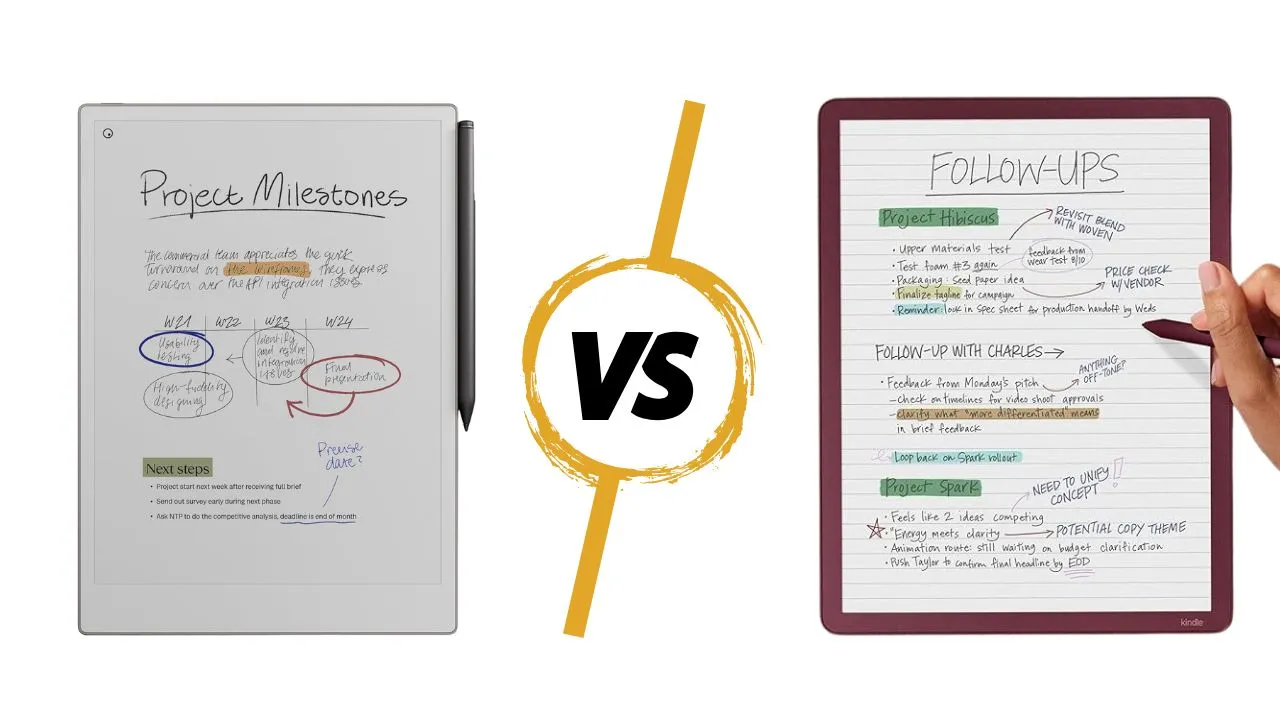
The race for the best color e-ink writing tablet just got serious. Amazon entered the arena with the Kindle Scribe Colorsoft, going head-to-head with reMarkable’s Paper Pro. Both devices come with premium pens, start above $600, and promise a paper-like experience that screens like the iPad simply cannot replicate.
Yet these two devices are not fighting for the same user. One is built for readers who also take notes. The other is built for writers who occasionally read. Get that distinction wrong, and you will spend over $600 on a device that frustrates you every day. Let’s break it down.
Quick Specs at a Glance
Before diving deep, here is a side-by-side look at the core specs:
| Feature | Kindle Scribe Colorsoft | reMarkable Paper Pro |
|---|---|---|
| Screen Size | 11 inches | 11.8 inches |
| Display Tech | Kaleido 3 (color filter/oxide layer) | Color Canvas (E Ink Gallery 3) |
| Resolution (B&W) | 300 PPI | 229 PPI |
| Resolution (Color) | 150 PPI | 229 PPI |
| Glare-Free | Yes | Yes |
| Thickness | 5.4 mm | 5.1 mm |
| Weight | 14.1 oz (400g) | 18.5 oz (525g) |
| RAM | 4 GB | 2 GB |
| Base Storage | 32 GB | 64 GB |
| Processor | Quad-core | Quad-core |
| Bluetooth | Yes | No |
| Charging | USB-C | USB-C |
| Battery Life | Up to 2 weeks | Up to 2 weeks |
| Price | Check Price | Check Price |
Price Breakdown and What’s Included
The Kindle Scribe Colorsoft starts at $629.99 with the pen included. The reMarkable Paper Pro starts at $629 with the standard Marker, but climbs to $679 once you add the Marker Plus.
The Kindle Scribe Colorsoft comes in two storage tiers: $629.99 for 32GB and $679 for 64GB. The reMarkable Paper Pro ships with 64GB as its baseline.
At the $679 tier, both devices cost exactly the same, but the Kindle is optimized for reading, while the reMarkable is built purely for writing.
Size and Portability
Kindle Scribe Colorsoft weighs about 400 grams and features symmetrical bezels on all sides, so you can hold it comfortably in either hand. It feels closer to a thin 11-inch tablet and slips into most standard laptop or tablet sleeves without a fight.
The reMarkable Paper Pro weighs around 525 grams and has a slightly larger footprint due to its 11.8-inch display and pronounced side bezel. It feels more like a hardcover sketchbook in the hand, which suits long writing sessions at a desk more than quick subway reading.
If you commute a lot or read on the couch at odd angles, Kindle’s lighter, more balanced design simply feels easier to live with every day. If your tablet lives on a desk, the reMarkable’s larger canvas will feel like a natural upgrade.
Display Quality: Color E-Ink Technology Compared
Kaleido 3 vs E Ink Gallery 3
These two devices use completely different approaches to display color, and that difference shapes everything.
The Kindle Scribe Colorsoft uses Kaleido 3 technology. It places a color filter over a traditional black-and-white e-ink base layer. That base layer delivers a sharp 300 PPI for text and monochrome images. But once you activate color, you drop to 150 PPI because the filter controls color at a lower resolution.
The reMarkable Paper Pro uses E Ink Gallery 3, also called Canvas Color. Here, color comes from actual CMYW ink particles inside the display itself, not from a filter on top. The result is a consistent 229 PPI whether you are looking at black text or a colorful sketch. The colors feel more “painted” and organic because they are literally generated within the ink layer.
In practice, the Kindle produces more vivid blues and deeper blacks because its filter amplifies contrast in the darker tones. The reMarkable shines on yellows, oranges, and magentas, but its blacks come out as a very dark blue rather than a true black. Neither device will look like an iPad or OLED display. Both produce softer, more pastel-like tones. But they fail in different parts of the color spectrum.
Brightness, Contrast, and Ambient Light
The Kindle Scribe Colorsoft has Nitride LEDs that produce noticeably brighter illumination. If you read in bed, dim offices, or on planes at night, the Kindle is significantly easier on your eyes. The reMarkable Paper Pro, by contrast, looks more natural and paper-white under ambient light because its Canvas Color display does not rely as heavily on a front light to produce high-quality color.
The key trade-off here is brightness versus natural color fidelity. If you care about how the screen looks under a sunny window, reMarkable wins. If you read at night or in low light regularly, the Kindle’s brighter Nitride LEDs pull ahead.
Screen Refresh Rate and Ghosting
Neither device is entirely free of ghosting, and both lack a manual refresh gesture to clear it. However, the Gallery 3 display on the reMarkable Paper Pro shows a visible black flash when switching between colors or turning pages. You might find it annoying; others may adapt quickly. The Kaleido 3 on the Kindle refreshes faster and feels more consistent during daily page-turning and navigation.
If smooth, consistent page turns matter to you, especially when reading heavily annotated books or long PDFs, the Kindle holds a clear edge here.
Writing experience: pen feel and latency
Both devices target people who actually write with a stylus, not just highlight text.
Stylus Design And Attachment
Kindle Scribe Colorsoft ships with a refined passive Premium Pen that attaches magnetically along the side. The pen feels nicely weighted, includes a side button you can map to tools like eraser or shader, and has a rubbery rear eraser that genuinely feels like a pencil eraser.
reMarkable Paper Pro supports Marker and Marker Plus, which are active pens that deliver tilt sensitivity and very tight tracking. Marker Plus also includes a rear eraser, and its barrel features a textured finish that prevents slippage during long sessions.
Both brands claim around 12 millisecond pen latency, and reMarkable hits that mark for black ink, but latency climbs to 25–33 milliseconds when writing in color or on colored backgrounds. Kindle Scribe Colorsoft feels snappy for handwriting in notes and books, though heavy use of color layers can still slow down any e-ink panel.
Surface Feel And Handwriting Comfort
Kindle Scribe Colorsoft slightly prioritizes visual clarity over heavy screen texture, so the surface feels smoother than earlier Scribe models. You get a gentle paper-like resistance, but the pen glides more, which can make some handwriting styles look a bit looser or less controlled.
reMarkable Paper Pro delivers one of the most convincing “chalk on chalkboard” feelings on any e-ink tablet today. The nib bites into the surface just enough, and the scratchy sound reinforces the sensation of writing on real paper. You may find your handwriting looks better on the Paper Pro because that resistance slows your strokes down in a good way.
If straight writing matters most, reMarkable Paper Pro clearly wins here.
Handwriting Tools And Color Options
Kindle Scribe Colorsoft keeps its tools simple but covers most needs. You get five pen types, including pen, fountain pen, marker, pencil, and a unique shader, each with five thicknesses and ten colors. The shader tool lets you blend overlapping colors, while a separate highlighter offers its own colors and thickness controls.
reMarkable Paper Pro gives you nine pen types, including a built-in highlighter, three thicknesses, and nine colors, including white. White matters when you want to mask parts of a PDF or drawing without actually erasing them, since you can paint over elements with the same background tone.
Kindle structures its color palette for annotation, first with clear reds, blues, greens, and yellows, which are ideal for marking up text and tasks. reMarkable leans into a sketchbook-style workflow, where you layer and blend colors across multiple layers to create richer art and concept sketches.
PDF Annotation And Page Management
PDF workflows often decide which device you stick with long-term.
On Kindle Scribe Colorsoft, PDF and notebook tools stay intentionally basic but surprisingly capable. You can annotate, highlight, use lasso selections, change colors on selected ink, move pages between notebooks, and export to email, OneNote, or OneDrive as PDF or text. For light-to-moderate PDF markup, that feels more than enough.
reMarkable Paper Pro goes deeper inside notebooks and imported PDFs. It supports multiple layers, page tags, rich lasso operations, including handwriting-to-text conversion in place, and very flexible page reordering within long planners or document sets. You can export pages as PDF, PNG, or SVG, choose orientation, and control grayscale conversion.
If you often manage complex planners, engineering documents, contracts, or lecture notes, reMarkable’s page tools and layer system feel more like a professional workflow tool than a reading-centric device.
Software, AI Features, and Ecosystem
Amazon Ecosystem: Kindle Library and Smart Notes
This is where the Kindle Scribe Colorsoft pulls way ahead for a specific group of users. If you own dozens of Kindle e-books, you get instant access to your entire library, the full Kindle bookstore, X-Ray, Page Flip, and dictionary lookups, all without any workarounds.
Amazon also baked solid AI features directly into the device. You can use the AI tool to refine your handwriting into a cleaner version using different font styles, effectively cleaning up messy notes without converting them to typed text. You can also trigger a page or full-notebook summarization with a single tap, and it returns a concise, accurate recap in about 20 seconds. Alexa Plus integration, OneNote, and Google Drive export round out a surprisingly capable productivity stack.
reMarkable Ecosystem: Templates, Slack, and Productivity
The reMarkable Paper Pro takes a different philosophy, distraction-free, focused work. Its interface is minimal by design, and that is a feature, not a limitation.
reMarkable integrates directly with Slack, letting you share handwritten notes in a channel without first exporting them to your phone. It also supports Google Drive, Dropbox, OneDrive, and Microsoft 365, making it more versatile for teams that use multiple cloud platforms. The Paper Pro supports AI-powered handwriting search and a rich library of structured note-taking templates. You can also add typed text directly to any document, select from multiple font sizes, add checklists with functional checkboxes, and adjust column widths. reMarkable’s AI search lets you find handwritten notes by keyword, even without converting them to typed text, a genuinely useful tool for heavy note-takers.
For enterprise users or anyone working in a collaborative environment with multiple tools, the reMarkable’s broader third-party integrations pull it ahead of the Kindle’s more closed ecosystem.
Reading experience
E-Book Reading Quality
Kindle Scribe Colorsoft is the clear winner for reading. The 300 PPI text layer looks crisp, the front light stays bright and even, and you get the full Kindle software stack, including dictionaries, X-Ray, notes, highlights, and cloud sync.
You can also write directly in the margins of Kindle books using Scribe Colorsoft, making it a rare device where reading and handwriting share the same context. For anyone with years of Kindle purchases, this alone often decides the choice.
reMarkable Paper Pro treats reading as secondary. There is no integrated bookstore, and you need to load DRM-free books or PDFs via the desktop or mobile apps. Once you do, reading feels fine, and the 11.8-inch screen gives books a spacious layout, but you miss the tight Kindle features and the ease of book discovery. If your library lives on Kindle, the Scribe Colorsoft is the only device in this category that brings everything together in one place.
Document And PDF Reading
For dense PDFs, academic papers, or corporate decks, reMarkable Paper Pro’s 11.8-inch display simply shows more at once with a slightly larger effective canvas area. Page zooming, panning, and navigation feel comfortable, especially when you add tags and templates.
Kindle Scribe Colorsoft loads documents quickly and often flips pages faster, which matters when you skim reports or long contracts. Text remains sharp, but the slightly smaller 11-inch screen shows a bit less per page in full-page view than Paper Pro.
If your reading leans toward e-books and light PDFs, Kindle Scribe Colorsoft feels better. If you live inside planners, legal documents, and multi-page diagrams, the extra space on reMarkable can pay off.
Battery Life And Performance
Both devices improved performance over their predecessors, but battery life is where the gap between them becomes impossible to ignore.
Real-World Battery Comparison
Amazon rates the Kindle Scribe Colorsoft for up to about eight weeks of reading on a charge and around two to three weeks of mixed writing and reading. If you use color, higher brightness, and Wi Fi more heavily, it will last one to two weeks of real-world heavy use, which still outpaces many tablets.
reMarkable Paper Pro lands closer to two weeks of mixed use, depending on brightness settings and Wi Fi sync. If you write a lot every day, you charge both more often, but Kindle still stretches farther between charges, especially if you read more than you sketch.
For travel, Kindle’s battery life and lighter draw per page turn make it easier to forget your charger at home.
Processing Speed And Responsiveness
Kindle Scribe Colorsoft runs on updated silicon that Amazon claims improves performance over prior Scribe generations. Navigation through libraries, notebooks, and AI features feels fast overall, though large documents can still take two to five seconds to open.
reMarkable Paper Pro feels slightly snappier when responding to raw handwriting on plain backgrounds due to the tight coupling between the pen hardware and the Canvas Color display. When you work with many layers and color fills, Gallery 3 refresh constraints appear more often, but in pure writing mode, it feels very smooth.
If you care about quick jumps across many books and AI-assisted note tools, Kindle has the edge. If you care about a consistent writing feel on a large canvas, reMarkable still feels very polished.
Who should buy which device?
At the start, we said one device is built for readers who also take notes, and the other for writers who occasionally read. Everything above confirms that split.
Buy Kindle Scribe Colorsoft if you:
- Already own a large Kindle library and want a single device for reading and note-taking within the same ecosystem.
- Use your tablet in low light or at night and want a bright, even front light that makes color content pop.
- Care about long battery life, lighter weight, and good performance for switching between books, notebooks, and PDFs.
- Prefer structured, color-coded annotations and AI features like handwriting refinement and automatic summaries.
In short, Kindle Scribe Colorsoft fits heavy readers, students, lawyers, and knowledge workers who want an e-ink productivity tablet that still behaves like a top-tier Kindle.
Buy the reMarkable Paper Pro if you:
- Want the best-in-class paper for writing and sketching, with a chalk-on-chalkboard feel.
- Spend more time planning, diagramming, and ideating than reading, and you value a larger canvas more than portability.
- Work in Slack, Google Drive, Dropbox, OneDrive, or Microsoft 365 and need a notebook that integrates with those workflows.
- Care about layered artwork, flexible PDF markup, and page-level organization, including tags, layers, and handwriting to text conversions.
For designers, writers, coaches, and professionals who live in planners and long-form notes, reMarkable Paper Pro feels like the more focused creative tool.
The Verdict
Both devices sit at the top of the color e-ink market right now, and neither is a bad choice. The Kindle Scribe Colorsoft earns its place as the best all-around e-reader with serious note-taking capability, outstanding battery life, and a seamlessly integrated Amazon ecosystem.
The reMarkable Paper Pro earns its price as the best digital writing surface available, built for professionals, creatives, and anyone who treats their notebook as their primary work tool.
Put simply, the Kindle Scribe Colorsoft is a reader that can write. The reMarkable Paper Pro is a writer that can read, sort of. We said that at the start, and everything in between confirms it. Know which one you are, and the decision makes itself.
Recommended Reading
3 Best Color E-Ink Tablets for Note-Taking (2026) Reviewed
Still weighing your options? This roundup goes beyond the Scribe Colorsoft and Paper Pro to cover the top color e-ink tablets competing for the note-taking crown in 2026. If neither of the devices above fully matched your workflow, this guide highlights alternatives that might hit closer to home.
Kindle Scribe Colorsoft & Kindle Scribe 3rd Gen: Every New AI Feature Explained
The Kindle Scribe Colorsoft’s AI tools, handwriting refinement, automatic summaries, and Alexa integration are some of its strongest differentiators. This deep dive breaks down exactly how each feature works in practice, so you can decide whether Amazon’s AI ecosystem genuinely fits your daily note-taking and reading habits.