BOOX Go 10.3 Gen 2 Lumi Review: What Changed?

The BOOX Go 10.3 Gen 2 Lumi arrives at a moment when the 10-inch e-ink tablet market still has very few real competitors. Good 10.3-inch devices with 300 PPI screens and front lights are surprisingly rare. The original Go 10.3 filled that gap well. Now BOOX is back with a second attempt, and the result lands somewhere between “exactly what people wanted” and “one trade-off you need to know about before you buy.”
Here is the bottom line upfront: this is a worthy successor. But BOOX made one change that will divide buyers. It dropped the EMR pen and switched to a capacitive stylus. Whether that ruins the device or barely matters depends entirely on how you plan to use it.
What’s New in the Gen 2?
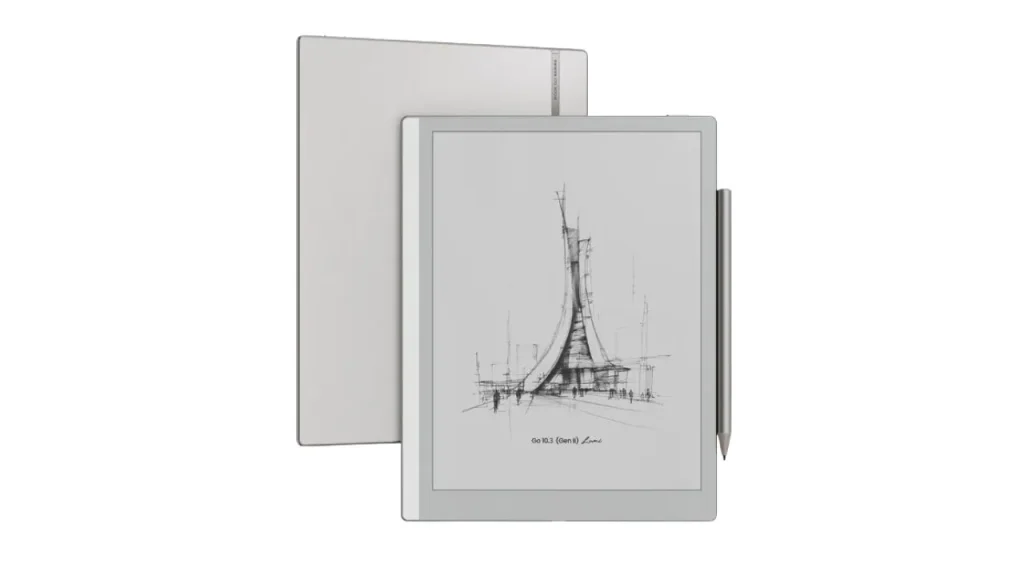
The Gen 2 Lumi builds on the original Go 10.3 instead of reinventing it. You still get the same thin design and paper-focused experience. The changes focus on usability and everyday convenience.
Key Hardware Upgrades
The biggest upgrade is the front light. The original model skipped it entirely, which limited where you could use the device. Now you can read at night or in dim rooms without needing an external lamp. The dual-tone CTM system lets you shift between a cool white at around 6,400 Kelvin for daytime reading and a warmer tone near 4,300 Kelvin (not very warm by market standards) for evening use, which helps reduce eye strain during long sessions.
Next comes the stylus. BOOX replaced the older magnetic EMR pen with the new InkSense Plus capacitive pen. This is a real compromise. EMR pens don’t need charging and usually feel more precise. Although the new pen still delivers strong accuracy and a satisfying writing feel, with a measured response time of around 25ms, faster than the Gen 1’s 30ms.
You also get an upgraded octa-core Snapdragon 690 chipset, the same one BOOX uses in the Note Air 5C, but paired with 4GB of RAM instead of 6GB like the Note Air 5C. It is not fast in the traditional tablet sense, but it feels responsive for an E Ink device. Apps open quickly, and navigation stays smooth enough for daily use. The software story also improves: the Gen 2 launches with Android 15, a notable step up from the Gen 1’s Android 12.
Lumi vs Standard Go 10.3 Gen 2
The Lumi version exists for one reason: the front light.
The standard Gen 2 keeps the thinner 4.8mm body but skips the light. The Lumi adds the lighting layer, keeping the total to 4.8mm.
Both versions share:
- 64GB storage (around 46GB usable)
- Snapdragon 690 processor and 4GB RAM
- 3,700mAh battery
- 364g weight /350g
- Identical core experience
Display Quality Examined
Screen Clarity and Sharpness
You get a 10.3-inch E Ink Carta 1200 panel with 300 PPI. That resolution matters more than it sounds. Text looks crisp, almost like laser-printed paper. Fine details in PDFs stay sharp, and small fonts remain readable.
The matte surface adds a paper-like texture. It cuts glare effectively, making outdoor reading easier. You can sit near a window or outside without fighting reflections.
Compared to lower-resolution E Ink tablets, this one feels noticeably cleaner. Lines look tighter. Letters look more defined. That difference becomes obvious when you read dense documents or annotate PDFs.
Front Light Performance (Lumi Exclusive)
The front light changes how you use the tablet. You no longer depend on external lighting. You can read in bed, in a dim office, or during travel without adjusting your environment.
Brightness reaches around 145 nits at the top (cold white setting at max) end and drops extremely low ( 0.15 nits) for night reading. That low minimum matters more than peak brightness. It lets you read in darkness without eye strain.
The color temperature range sits between neutral white and a warmer tone. The warm setting does not go as amber as some competitors.
Battery impact stays reasonable. At around 40 nits, you still get close to 10 hours of use during writing sessions.
One drawback shows up in ghosting. You may see faint traces of previous content after page changes. It does not ruin the experience, but you will notice it if you look for it.
Writing and Stylus Performance
InkSense Plus Stylus Deep-Dive
This is the most debated change in Gen 2. BOOX dropped EMR and switched to the InkSense Plus capacitive pen. EMR styluses are passive; they don’t need charging and work with a wider range of third-party pens. Capacitive active pens require their own battery and separate charging via USB-C.
But the writing experience on the Lumi is better than you’d expect from capacitive tech. The screen texture holds that paper-like resistance from the Gen 1. The InkSense Plus has a firmer, pointier tip than most EMR pens, which gives strokes a slightly pencil-like feel. Small strokes land accurately. Pressure response across all 4,096 levels feels natural.
Latency sits at around 25ms, an improvement over Gen 1’s measured 30ms. That’s perfectly usable for handwriting and note-taking. However, the front-light layer increases the pen-to-pixel distance compared to Gen 1.
The unavoidable downside of capacitive pen tech shows up as diagonal lines that carry a slight wobble. It’s a known limitation of the technology, not a flaw specific to this device. For general note-taking, most users won’t bother with it. If you draw precise technical diagrams or you’ve been frustrated by line wobble on other capacitive tablets, take note.
There is no tilt sensitivity on the pen, and also no eraser at the top of the pen, though the side button handles stroke deletion quickly enough. And because the pen uses a USB-C charge, you need to remember to top it up separately. In practice, the pen’s battery life is far longer than it sounds; testing showed roughly 50 hours of runtime (It’s an estimate, not a confirmed full-cycle result), meaning heavy daily use only requires charging about every two weeks.
The pen attaches magnetically to the side of the device more securely than the older Boox Pen Plus did on the Gen 1, which was a known weak point of that model.
Note-Taking Workflow
The BOOX Notes app remains one of the deepest note-taking systems on any e-ink device available today. You get pen types, layers, shape tools, the lasso tool, customizable templates (with support for importing your own), audio recording, handwriting-to-text OCR, and handwriting search.
The handwriting search feature is particularly useful once you have large amounts of notes. Scrolling through dozens of pages to find something specific is impractical. Search solves that. After initial activation online, it runs offline afterward.
The toolbar is now detachable, resizable, and fully customizable. You can build different toolbar themes and switch between them quickly. For people who write often, those adjustments save real time over the course of a day.
Infinite canvas mode lets you expand your writing space in any direction, which works well for mind maps, rough planning, and sprawling notes. It’s still a separate note type rather than being built directly into standard page-based notes, which limits it slightly, but it’s a genuine addition for certain workflows.
BOOX Assistant handles handwriting recognition and smart lasso tools. If you encounter any issues activating these features, the fix is simple: temporarily connect to a different Wi-Fi network, activate the AI tools, and they will work normally from that point forward.
Cloud sync with Onyx Cloud and cross-app integration all work as expected.
Drawing and Sketching Capabilities
For drawing and artistic work, the capacitive pen holds up reasonably well. Accuracy on small strokes is comparable to the BOOX Tab X C, and the pressure curve feels consistent throughout a session. Palm rejection works reliably during extended writing.
The main trade-off versus EMR for artists is the diagonal line wobble issue. EMR pens still offer better precision for technical drawing and illustration. If drawing is your primary use case, the Tab X C or a device with an EMR digitizer will serve you better. For mixed note-taking and occasional sketching, the InkSense Plus handles most tasks without friction.
Third-party stylus compatibility is more limited than with EMR. Pens from reMarkable, BOOX’s Tab X C, and other Amazon brands mostly work to varying degrees. Fewer attach magnetically to the device’s side. With EMR, almost any compatible pen works out of the box. With capacitive, your options narrow down somewhat.
Reading Experience
eBook and Document Reading
NeoReader supports 26 file formats, including PDF, EPUB, MOBI, and DOCX. BOOX’s PDF handling stands out in this category. The columns reading mode lets you zoom into specific sections of a multi-column document and jump between segments automatically, genuinely useful for academic papers, research documents, and technical manuals.
Annotation writes directly into PDF files. You copy the annotated file back to your computer, and all markups are already embedded. No export steps, no format conversion. Cloud sync options provide an automated alternative if you prefer not to transfer files manually.
Font customization, highlight tools, and annotation in ebooks all work well. A new text-styling system, similar to what Kindle uses, lets you save reading presets and switch between them quickly. Split-screen mode, running a PDF reference alongside a notes page, works and is useful for studying or research sessions.
The ebook library provides sorting and filtering tools, and dictionary lookup works both online and offline (though adding local dictionaries requires manual sideloading, which can be time-consuming to set up).
Audiobook and Multimedia
The dual speakers sit at the bottom of the device. Audio quality is adequate for listening to text-to-speech or spoken content, though not suitable for music or entertainment. The built-in microphone supports audio note recording inside the BOOX Notes app.
Text-to-speech runs through Android’s speech synthesis, so it doesn’t sound like a professional narrator. But it works for following along with a book while doing something else, for accessibility, or for language learning. You can download different voices and dialects through Android to improve the experience.
Video playback works in fast refresh mode, choppy, but functional. This is an e-ink device, not a video player. Use audio features when convenient, but don’t expect media performance to rival that of a tablet.
Performance and Software
Android 15 on E Ink
The Gen 2 ships with Android 15, which is a real step forward from the Gen 1’s Android 12. App compatibility will hold up longer, and the more recent security foundation helps.
Refresh rate modes include A2 for fast navigation, X, Regal, Normal, and Speed, giving you options for different use cases. BOOX now calls its display tuning system “E Ink Wiseor Boox E Ink Center.” E Ink Wise handles per-app refresh settings with a more approachable interface than the older mode-based system. Advanced users can still fine-tune individual apps if needed.
One software note, some launch units showed instability issues, including apps force-closing and a browser bug that required a restart. The control center had a repeatable bug where scrolling to brightness settings closed the panel on the first try. These are software bugs, not hardware problems. So, check recent user reports before buying.
Regarding privacy, the device occasionally connects to Chinese servers, even when cloud services and update checks are disabled. This is a known trait across BOOX devices. If that bothers you, a software firewall addresses it.
Multitasking and App Performance
Performance feels snappy for an e-ink device. Apps like Kindle, reading apps, notes, and moderately complex Android apps run without noticeable delays. The Snapdragon 690 with 4GB RAM handles everyday work tasks, document management, and reading apps comfortably.
Apps not designed for e-ink displays will exhibit visual quirks at higher levels of complexity. This is a display limitation, not a processor one. Wi-Fi dual-band (2.4/5GHz) and Bluetooth 5.1 cover connectivity needs. The device lacks expandable storage, so plan around 46GB of usable space.
Battery Life — Real-World Testing
With the front light off, the Lumi lasted 55 hours in testing, nearly double the Note Air 5C’s runtime under similar conditions. At 40 nits of front light, the runtime dropped to 22 hours of reading. Writing-heavy use with the front light off measured 11 hours. With the front light set to 40 nits, writing time still held at roughly 10 hours.
That’s a strong result. The device doesn’t run BOOX Super Refresh technology, which saves battery compared to models that do.
How It Compares to Rivals
vs. reMarkable 2
The reMarkable 2 runs at 227 PPI compared to BOOX’s 300 PPI, and that difference is visible when reading small text or fine-detail PDFs. The reMarkable still uses EMR, which gives it a precision edge in drawing and diagonal-line accuracy. But it runs a closed operating system with no Android apps and charges a subscription fee for cloud features.
The BOOX Go 10.3 Gen 2 Lumi runs full Android 15 with Google Play, meaning you can install Kindle, Notion, calendar apps, and anything else from the Play Store. For people who want more flexibility beyond reading and handwriting, BOOX wins this comparison. The reMarkable appeals to users who want simplicity and don’t need extra apps.
vs. Supernote Manta
The Supernote Manta is also worth a look for heavy writers. Supernote Manta has a larger, sharper, flexible E Ink screen. However, Supernote lacks a front light on its 10.7-inch 300 PPI display. If you want to read or write in a dark room, the BOOX Lumi is the clear winner.
The Lumi sits in a unique spot. It offers high resolution and a front light. It handles your library, your notes, and your work apps all in one thin device.
Who Should Buy the BOOX Go 10.3 Gen 2 Lumi?
Students and academics who annotate PDFs and research papers will get a lot out of this device. The PDF tools are the best available on any e-ink tablet right now, and the depth of note-taking is suited to long study sessions.
Writers and journalists looking for a distraction-free drafting tool will appreciate the combination of a large screen, paper-like writing feel, and front light for working in any environment. Android’s openness means that apps like Notion and text editors run alongside the device’s native tools.
Professionals who want a portable digital notebook with genuine longevity, months of standby battery life, a durable build, and a deep software ecosystem will find this fits the role well. If you owned the Gen 1 and wanted a front light, this is a clear upgrade.
Users who need color e-ink should look at the BOOX Note Air 5C or the reMarkable Paper Pro. Neither the standard Gen 2 nor the Lumi offers color.
Budget buyers under $300 will find better value in older BOOX models or earlier-generation devices.
If you currently own the Gen 1 and the front light wasn’t a priority for you, the upgrade is hard to justify. The writing feel, screen quality, and general workflow stay close enough that most Gen 1 owners without a specific need for the light can skip this one.
For everyone else, especially first-time buyers in the 10-inch e-ink category, the BOOX Go 10.3 Gen 2 Lumi offers one of the best combinations of screen quality, note-taking tools, reading features, and Android flexibility available right now. At around $450, nothing in this category matches it point-for-point.
Recommended Readings!
Boox Note Air 5C vs 4C Differences: Should You Upgrade?
Boox Palma 2 Pro vs reMarkable Paper Pro Move: Which E-Ink Device Wins?