Kindle 12th Gen Review: The Best Basic Kindle Ever Made, With One Glaring Compromise
Amazon’s entry-level Kindle just got a serious glow-up. The 12th-generation Kindle (2026) ships with a redesigned body, faster performance, a flush display, and a new aluminum option that feels nothing like the cheap plastic Kindles of the past. But these hardware upgrades come at a cost. Amazon raised the starting price of both the 16GB model and the 32GB aluminum version compared to previous entry-level models. It’s no longer the budget impulse buy it used to be.
What’s New With the 2026 Kindle (12th Gen)
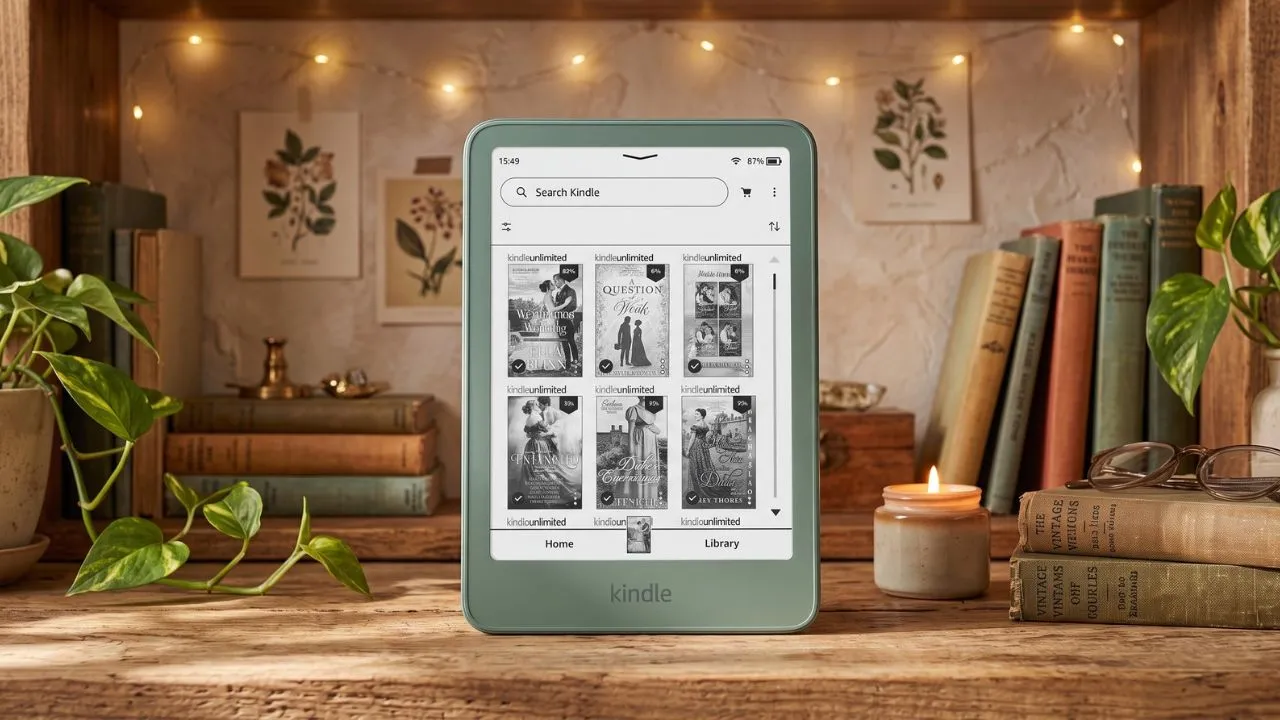
Amazon launched the Kindle 12th gen with two distinct versions. The standard 16GB model comes in Graphite or Ube (a rich plum purple) with a plastic body. The 32GB model comes in Alpine Sky or Seaglass Green, both wrapped in an aluminum unibody shell. Both versions share the same 6-inch, 300 ppi E Ink display, software, and new design language.
The biggest visual change hits you the second you pick it up. Amazon ditched the recessed screen for a flush, edge-to-edge display. The bezels now match the body color instead of defaulting to plain black. The power button moved from the bottom edge to the side. And books open roughly 30% faster than on the 2024 model.
These sound like incremental spec-sheet upgrades. In your hand, they feel like a completely different device.
Kindle 2026 Specifications: 16GB vs. 32GB Aluminum
Both versions share the same screen size, pixel density, and battery duration. Your choice mainly affects the housing, colors, storage, and weight.
| Feature | Kindle 16GB | Kindle 32GB aluminum |
|---|---|---|
| Screen | 6 inches, 300ppi | 6 inches, 300ppi |
| Front design | Flush screen | Flush screen |
| Weight | 140g | 162g |
| Dimensions | 108 × 152.8 × 6.85mm | 108 × 152.8 × 6.9mm |
| Available storage | 10.8GB | 24.7GB |
| Colors | Graphite, Ube | Alpine Sky, Seaglass Green |
| Adjustable brightness | Yes | Yes |
| Adjustable warm light | No | No |
| Waterproofing | No | No |
| Battery claim | Up to six weeks | Up to six weeks |
| Charging connection | USB-C | USB-C |
| Lockscreen ads | Starting configuration includes ads | No ads |
| Price | Check Price | Check Price |
Design and Build: Finally, a Basic Kindle That Feels Premium
16GB Plastic vs. 32GB Aluminum Build
For years, the Kindle Basic earned its name by feeling, well, basic. Functional and light, sure. But the hard plastic housing across multiple generations always had a distinctly budget vibe. You picked it up knowing you bought the cheap one.
The 2026 model changes that equation, especially the aluminum variant. The back, sides, top, and bottom flow as one continuous piece of machined aluminum with soft, rounded edges. It feels rigid, dense, and genuinely well-made. It feels premium and sturdy without being cumbersome.
Even the standard plastic 16GB model benefits from the new design philosophy. The flush display and color-matched bezels give it a modern look that the old recessed-screen Kindles never achieved. Amazon also nailed the bezel proportions this generation. The borders are slim enough to look thoroughly modern, especially next to thicker-bezeled rivals like the Kobo Clara, yet remain just wide enough to give your thumb a comfortable resting spot without triggering accidental page turns. At 4.3 x 6.0 x 0.3 inches, the 2026 Kindle is slightly smaller and thinner than the 2024 version. The 16GB model weighs just 4.9 ounces (140g), while the 32GB aluminum variant weighs 5.7 ounces (162g).
That aluminum version adds some weight. You’ll notice it if you hold both models side by side. But 162 grams is still absurdly light for a metal device, and the added heft actually makes it feel more balanced and satisfying to hold during long reading sessions.
A thin rubber lip runs around the edge of the front glass. It adds a bit of grip when you set the Kindle face-down and acts as a tiny spacer to protect the glass from scratches. You won’t notice it at first, but you’ll appreciate it over time.
The Power Button Finally Moved
The most practical design change sits along the outer frame. Amazon finally moved the power button from the bottom edge to the right side. On older models, resting the device on your pinky finger or setting it upright on a table frequently triggered accidental power presses that turned off the screen mid-sentence. Moving the button to the side eliminates this frustration entirely.
You won’t find this feature on any spec sheet comparison, but it might be the single most satisfying day-to-day improvement Amazon made.
New Cases and the Kindle Click Remote
Amazon also updated its accessory lineup to complement the new form factor. You can pair the aluminum model with a magnetic-attach flip cover made from plant-based leather, or choose a redesigned fabric cover with fully wrapped edges and no harsh plastic borders with a 16GB Kindle. Amazon offers a stylish sling bag for travel and introduces the Kindle Click, a wireless page-turn remote sold separately that lets you flip pages remotely while keeping your hands warm under blankets.
Display: Sharp, Clean, and Flush
The 2026 Kindle keeps the same 6-inch, 300 ppi E Ink Carta 1200 display. Text looks clean and crisp at any font size. You won’t find yourself squinting or wishing for more resolution. At 300 ppi, individual pixels disappear, and optimized font rendering makes letters look smooth and well-defined.
The shift to a flush screen does introduce a trade-off, though. The 2024 Kindle’s recessed display had no additional layer over the E Ink panel, which gave it a paper-like appearance with exceptional sharpness. The 2026 model’s flush glass adds a protective layer over the screen. You may notice a slight reduction in perceived crispness, and the display looks less white.
The contrast on the new screen looks slightly better with the front light on, and the front-light distribution is impressively even. That’s a meaningful improvement over older Kindles where uneven lighting could distract you in dark rooms.
Ghosting is slightly more pronounced than on the 2024 model. This is a broader E Ink industry trend, not a Kindle-specific problem, and it doesn’t noticeably affect normal reading. You’ll see faint traces of the previous page for a split second after turning, but they vanish immediately.
The Flush Bezel Gap and Light Bleed Quirk
The move to a flush screen and color-matched bezels also introduces a minor optical quirk that you won’t spot in promotional photos. Because the screen isn’t fully laminated, the E Ink panel sits slightly recessed beneath the top protective layer, and the active white display area stops a fraction of a millimeter short of the frame, noticeably further back than on the Kindle Paperwhite. Underneath that tiny gap sits an internal black border designed to stop the front light from bleeding through the casing.
If you hold the Kindle straight on at a normal reading angle, you likely won’t notice it. Tilt the device slightly or set it flat on a coffee table or bed while you read, and that space between layers reveals a thin, dark gap along the top edge of the screen.
Technically, almost every front-lit e-reader has this border, from older Voyages and Paperwhites to Kobo models. On black-bezel Kindles, the dark inner border blends seamlessly into the frame. On the 2026 Kindle’s lighter, color-matched bezels, especially Alpine Sky, Seaglass Green, and Ube, the contrast makes that dark line pop.
If you read primarily in dark mode, the effect reverses: light reflecting inside the gap can create a faint white halo along the edge. Amazon has also reportedly acknowledged a light-bleed issue affecting an early batch of 2026 Kindles, so if your screen looks unevenly lit out of the box, it’s worth exchanging. For most readers, the border gap disappears as soon as you get lost in a chapter. But if minor visual details easily distract you, keep that in mind before choosing a lighter color.
The Warm Light Problem
This is where the Kindle 12th Gen 2026 nose-dives, because the best basic Kindle ever made is still missing one comfort feature that almost every competitor includes at this price.
The 2026 Kindle has a front light. You can adjust its brightness from 0 to 24. The light looks even, improves contrast, and works well for reading in dim rooms. What you cannot do is adjust the color temperature. The light is fixed at a single, cool-white tone. There is no warm light option.
If you do most of your reading during the day or with a lamp nearby, this won’t bother you much. But if you read in bed, that bluish-white glow matters. Warm light, the kind that shifts from cold white toward yellow or orange, reduces eye strain during nighttime reading. The Kindle Paperwhite has offered this for years. Competitors from Kobo, even smaller brands like XTEINK and Boox, include color-temperature adjustment on devices that cost less than this Kindle.
The 2026 Kindle leans slightly warmer than the 2024 model, even without dedicated warm-light control. It’s not a dramatic difference, and it varies by panel lottery (each E Ink panel has a slightly different tint). But if the 2024 Kindle’s cool blue light bothered you, the 2026 will likely feel gentler on your eyes.
Still, the absence of an adjustable color temperature is hard to defend. At today’s price, it feels like Amazon is protecting the Paperwhite’s territory.
Performance and Software
System performance receives a major upgrade thanks to a faster internal processor. Amazon claims 30 percent faster book-opening times than previous generations, and real-world testing supports it. Opening a complex ebook file takes approximately three seconds on the 2026 model, compared to five seconds on 2024 devices.
When you test the two generations side by side, certain actions clearly favor the new hardware. Dragging your finger across a sentence to highlight a quote, tapping the top bar to summon the brightness menu, and swiping through multi-page library grids all react noticeably faster on the 2026 unit. Standard page turns inside a novel and typing on the on-screen search keyboard feel almost identical on both models.
For software, you get Amazon’s familiar, distraction-free operating system. No email pop-ups, social media feeds, or web notifications. The home view splits into two tabs: a Home feed showing your recent reads alongside store recommendations, and a clean Library tab in the bottom right corner displaying your purchased and downloaded titles.
Inside any book, tapping the top edge reveals typography controls for font family, font size, line spacing, and margins. You can also view downloaded PDF files, like daily planners, on the crisp 300 ppi display, though the screen supports touch navigation only and lacks stylus support. If you listen to audiobooks, you can pair Bluetooth headphones or speakers to stream Audible AAX files or use the English-only VoiceView text-to-speech screen reader.
The ecosystem lock-in remains the same as every Kindle before it. If your library lives on Amazon, you’ll love how smoothly everything connects. If you want to sideload books from other stores or use EPUB files directly, you’ll need to convert them first (the Kindle supports EPUB through conversion, but not natively). This isn’t new, and it’s unlikely to change.
Battery Life and Charging
Amazon rates the 2026 Kindle at up to 6 weeks on a single charge, based on 30 minutes of daily reading with wireless off and the front light set to 13. That tracks with real-world use. E Ink displays only draw power when you turn the page or adjust the front light, so battery drain during reading is almost nonexistent. You’ll forget to charge it because you rarely need to.
When you do plug in, a full charge takes about 2 hours with a 20W USB-C adapter. Speaking of which, Amazon no longer includes a USB-C cable in the box. No charger, no cable, just the Kindle and a sheet of product information. You’ll need to supply your own, which feels a bit cheap.
It’s not all cutbacks, though. In a notable departure from every previous generation, the 2026 Kindle ships with a user-replaceable battery. The back panel on the plastic 16GB models pops off without tools; plastic tabs hold it in place, and it snaps right back on. The battery itself is secured by four Phillips-head screws, making a future swap straightforward once replacements become available. The aluminum 32GB models require removing two small hex screws from the frame before the back panel comes free, but the process is otherwise identical. It’s a welcome repairability win for a device category where degraded batteries have traditionally meant buying an entirely new reader.
Kindle 16GB vs. 32GB Aluminum: Which Model Should You Buy?
Who Should Buy the 16GB Model
The 16GB Kindle (Graphite or Ube) is available in a base tier with lockscreen ads, or you can pay a small upfront premium to get it without them. It has a plastic body, weighs just 140 grams, and offers 10.8 GB of available storage after the operating system takes its share. That’s enough for thousands of books.
If you want the lightest possible Kindle and don’t care about the aluminum build, this is the one for you. The Ube color is already a crowd favorite. Just know that it’s plastic, not metal, so it doesn’t have that same dense, rigid feel.
The 16GB Graphite model has one hidden advantage if you are particular about screen aesthetics. Because its front bezel is dark rather than pastel, it naturally hides the thin black inner border around the recessed E Ink panel that stands out when you tilt the lighter-colored models at an angle.
Who Should Buy the 32GB Aluminum Model
The 32GB model in Alpine Sky or Seaglass Green costs more and doesn’t include lock screen ads. You get double the storage (24.7 GB available), a full aluminum unibody, and two genuinely attractive color options. For standard text-only novels, 32GB is massive overkill; you could download your entire library and barely scratch the surface. That extra headroom pays off with Audible audiobooks and image-heavy graphic novels, which eat up gigabytes quickly.
The weight bump to 162 grams is barely noticeable, and the build quality makes this feel like a device that costs twice what Amazon charges. If you are a former Kindle Oasis owner who misses that signature aluminum shell, or you simply want the best physical experience the basic Kindle line has ever offered, this is the one. The aluminum construction, matched bezels, and refined proportions make it hard to go back to plastic once you’ve held it.
One practical trade-off to keep in mind. If you ever need to replace the battery down the line, the plastic 16GB model is slightly easier to service. Its back panel pops off with your fingers. The aluminum model requires removing two tiny hex screws first nothing dramatic, but you’ll need the right bit on hand.
How It Compares: Should You Upgrade or Buy an Alternative?
Kindle 2026 vs. Kindle 2024: Is It Worth Upgrading?
If you already own the 2024 Kindle Basic (the Matcha model), upgrading comes down to how much you value the new design. The displays use similar E Ink technology. The reading experience is nearly identical. The 2026 opens books a couple of seconds faster, and UI navigation feels a touch snappier, but neither difference is dramatic. What you’re really paying for is the flush screen, side power button, smaller form factor, and aluminum option.
If your 2024 Kindle works fine and the power button doesn’t bother you, keep it. If you’re coming from a 2022 model or older, the 2026 is a much more compelling jump.
Kindle 2026 vs. Kindle Paperwhite and Competitors
That higher price tag pushes the 2026 Kindle uncomfortably close to the Kindle Paperwhite. Compared to the base model, the Paperwhite gives you a larger 7-inch Carta 1300 screen, full waterproofing for bathtub or poolside reading, a longer-lasting battery, and an adjustable warm front light. If you read in a dark bedroom every night, spending that extra on the Paperwhite solves the blue-light problem immediately.
That said, bigger isn’t automatically better for everyone. The 7-inch Paperwhite feels noticeably heavier and bulkier during one-handed reading sessions or when tossed into a jacket pocket for a coffee-shop run. Many readers also prefer the psychological momentum of a compact 6-inch display; flipping pages more frequently makes it feel like you’re flying through chapters faster.
Outside Amazon’s walled garden, competitors give you more hardware features per dollar. Kobo (especially with the 6-inch Clara BW), PocketBook, and Boox build compact 6-inch e-readers with warm front lights and open file support, without locking you into Amazon’s store. Even ultra-compact pocket readers like the XTEINK X4 Pro and Boox Picco offer adjustable color-temperature lighting for less than Amazon’s plastic base model.
However, none of them match the Kindle’s tight integration with Amazon’s bookstore or its polished, distraction-free reading software. But if warm light at a lower price matters more than ecosystem convenience, you have options.
Kindle 12th Gen (2026): Pros and Cons
Pros
- Modern flush display: Features a 6-inch, 300 ppi edge-to-edge screen with color-matched bezels and impressively even front-light distribution.
- Premium aluminum option: The 32GB tier ditches plastic for a rigid, well-balanced machined aluminum unibody.
- Relocated power button: Moving the button from the bottom edge to the right side finally eliminates accidental screen shutoffs mid-sentence.
- Snappier performance: Opens books roughly 30% faster than the 2024 model, with noticeably quicker text highlighting and menu navigation.
- Ultra-lightweight with six-week battery: Weighs just 140g (16GB) or 162g (32GB) while maintaining up to six weeks of battery life on a single charge.
Cons
- No adjustable warm light: The front light is fixed at a cool-white tone and lacks color-temperature control for bedtime reading.
- Awkward pricing: The higher starting price pushes it uncomfortably close to the Kindle Paperwhite and undercuts its budget appeal.
- Slight optical trade-off: The protective flush layer makes the display look slightly less white and crisp than the 2024 model’s recessed screen, and the lighter color-matched bezels expose a thin dark inner border along the top edge when viewed at an angle.
- No waterproofing: Lacks water resistance for bathtub or poolside reading.
- No charging cable included: It ships without a USB-C cable.
Verdict: Should You Buy the Kindle 12th Gen (2026)?
The Kindle 12th Gen 2026 is, without question, the finest entry-level Kindle Amazon has produced. The aluminum build feels spectacular. The flush display looks modern and clean. The relocated power button solves a long-standing annoyance. And the faster performance, though modest, makes everything feel a little more polished.
But at this price point, this device sits in an awkward middle ground. Amazon improved the hardware dramatically while keeping the feature set deliberately limited to protect the Paperwhite above it. The lack of adjustable warm light at this price turns what should be a universal recommendation into a conditional one.
Recommended Reading
The Ultimate Guide to Kindle Storage: 8 GB vs. 16 GB vs. 32 GB
Deciding between the standard 16GB plastic Kindle and the 32GB aluminum edition goes beyond build quality. See exactly how many text-only ebooks, image-heavy graphic novels, and Audible audiobooks fit into each storage tier so you can pick the right capacity without overpaying for space you will never use.
How to Read E-Books for Hours Without Eye Strain
Since the 2026 Kindle lacks an adjustable warm light and displays a fixed cool-white tone, reading in dark bedrooms requires a few adjustments. Learn practical ways to balance front-light brightness, typography settings, and ambient room lighting so you can read comfortably for hours without eye strain.