Amazon Alexa Tablet 12 Pro: 14 Crucial Things to Know Before You Buy
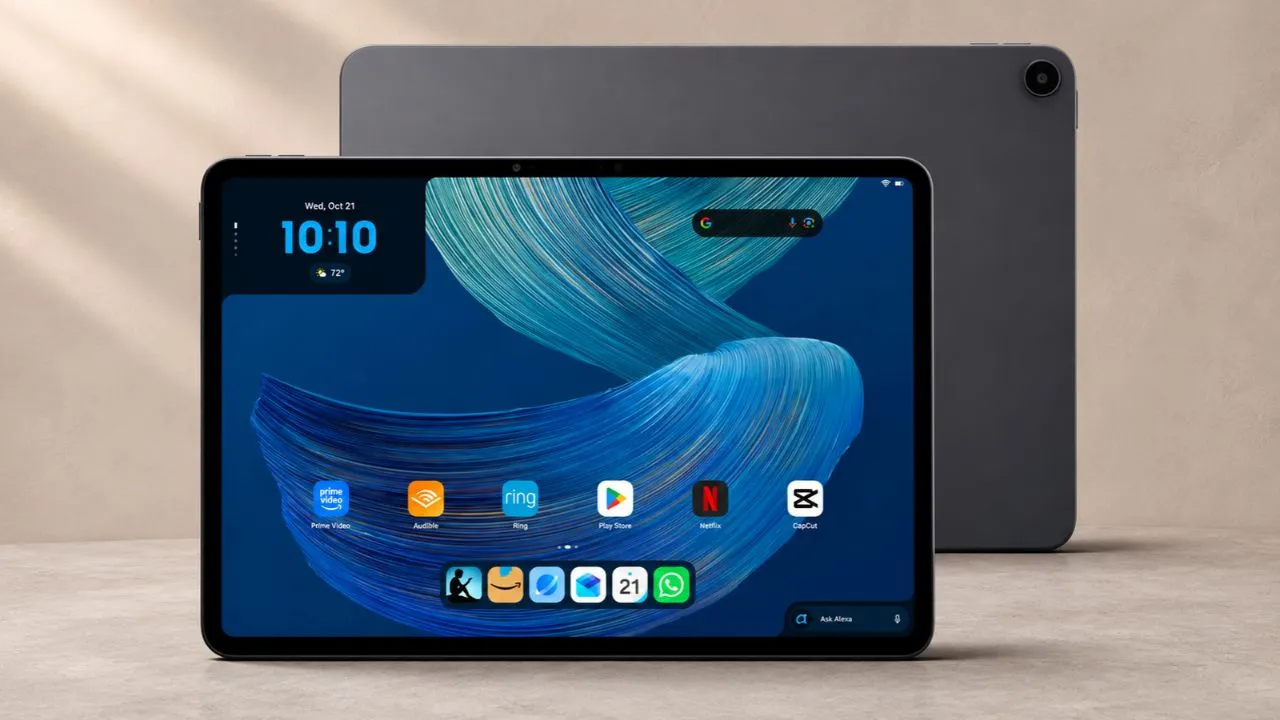
Amazon has retired the Fire tablet. In its place, the company has shipped something few expected: the Amazon Alexa Tablet 12 Pro, a premium Android tablet with full Google Play Store access, a display that rivals devices twice its price, and the fingerprints of one of tech’s best hardware designers all over it. It takes aim at mid-range iPads and Samsung Galaxy Tabs without charging flagship prices.
That said, this is a first-generation reboot, and spec sheets never tell the whole story. Before you hit the buy button, here are 14 things worth knowing about the Alexa Tablet 12 Pro.
Quick Buyer’s Summary
The Amazon Alexa Tablet 12 Pro ditches Fire OS for full Android 16 and native Google Play Store access, wrapped in a balanced 550-gram aluminum frame designed by former Microsoft Surface chief Panos Panay. Its 12-inch 120Hz 2.8K display (especially the optional glare-free Nano Matte edition), responsive USI stylus, and Surface-style keyboard make it a standout mid-range productivity and reading slate. Just watch out for the permanently fixed storage (no microSD slot), missing 3.5mm headphone jack, and persistent Alexa Plus home screen integration.
Amazon Alexa Tablet 12 Pro: Key Specs
| Feature | Official Specification |
|---|---|
| Operating System | Android 16 with native Google Play Store (Android 17 confirmed) |
| Display | 12-inch IPS LCD (3:2 aspect ratio), 2.8K (2800 × 1840), 280 PPI, up to 120Hz |
| Screen Finish | Standard Glossy or optional Corning Nano Matte anti-reflective glass |
| Processor | MediaTek Dimensity 8400 (4nm, 8-core Arm Cortex-A725 up to 3.25GHz) |
| RAM & Storage | 8GB RAM / 128GB internal storage (Check if 16GB/256GB tier is live) |
| Expandable Storage | No (microSD card slot removed) |
| Battery & Charging | 9,000 mAh (up to 16 hrs video / 20 hrs Kindle mode); 27W USB-C charging |
| Audio | Quad speakers with Dolby Atmos (No 3.5mm headphone jack) |
| Ports | 1× USB-C 3.2 Gen 1 (5Gbps data, DisplayPort video out, audio, charging), 4-pin magnetic keyboard connector |
| Cameras | 8MP front (horizontal bezel) + 13MP rear (both 1080p Full HD video) |
| Biometrics | Power-button fingerprint sensor |
| Dimensions & Weight | 6.5mm thin; 19.4 oz (550 grams) |
| Official Accessories | Alexa Tablet Pro Keyboard, Alexa Tablet Pro Pen, 12 Pro Folio Cover, Amazon 35W Dual USB-C Adapter (all sold separately) |
Full Android 16 and Google Play Store (Goodbye, Fire OS)
Let’s get the obvious out of the way. The Alexa Tablet 12 Pro runs full Android 16 with native Google Play Store access. That means YouTube, Gmail, Chrome, Netflix, Google Docs, and every other app you actually want to use. No sideloading. No workarounds. No fighting Amazon’s locked-down app store.
You can sign in with your existing Android phone during setup, transfer your data in minutes, and download your favorite productivity apps, Clip Studio Paint, or Call of Duty Mobile without sideloading a single file. Amazon also pledges four years of software updates and has already confirmed an upcoming upgrade to Android 17.
You still see Amazon’s DNA across the home screen, of course. The company preloads Prime Video, Audible, Kindle, Amazon Music, and its cloud gaming service, Amazon Luna. You get the convenience of your Prime media library alongside the freedom of a genuine Android tablet.
Surface-Inspired Build Quality and Ergonomics
If the hardware on the Amazon Alexa Tablet 12 Pro reminds you of a classic Microsoft Surface Pro, your eyes are not playing tricks on you. Three years ago, former Microsoft hardware chief Panos Panay left Redmond after budget cuts hit the Surface division and took over devices and services at Amazon.
Panay obsesses over tactile hardware engineering that never shows up on the back of a retail box. His team engineered the center of gravity across the 6.5-millimeter frame so evenly that you can balance the entire 12-inch slab on the tip of one finger. At 19.4 ounces, or 550 grams, the tablet feels substantial in two hands without pulling your wrists down to one side.
Small ergonomic touches appear all over the gray aluminum body. The volume rocker sits on the top-left edge and automatically flips its up-and-down behavior whenever you rotate the screen between vertical and horizontal orientations. Right-handed users should note one quirk: in horizontal mode, the power button and built-in fingerprint sensor sit on the left side, so you will want to register a left-hand finger for quick sign-ins.
The 120Hz Nano Matte Display Is a Standout Upgrade
The standard Alexa Tablet 12 Pro features a 12-inch IPS LCD panel with 2.8K resolution (2800 x 1840), 280 PPI, and a 120Hz refresh rate. That alone is a solid screen.
But the real story is the optional Nano Matte display. This anti-reflective glass treatment is exclusive to the 12 Pro model, leaving the smaller Alexa Tablet 11 and Alexa Tablet 8 with standard glossy panels.
Amazon partnered with Corning to create this finish. Instead of slapping a grainy matte screen protector on glass, they etched the glass itself at the sub-pixel level. The result kills glare without making the image look blurry or washed out. Colors stay accurate. Text looks like it’s sitting directly on top of the glass rather than behind it.
The result reminds you of Samsung’s art-focused Frame TV. Overhead studio lights, coffee shop lamps, and sunny airplane windows barely register on the panel.
Gamers get an unexpected bonus here too. During long matches in Call of Duty Mobile, warm, sweaty thumbs glide across the smooth matte finish instead of sticking to glossy glass.
The 3:2 Aspect Ratio Is Built for Multitasking (Not Movies)
Amazon chose a 3:2 aspect ratio for the 12 Pro’s display instead of the more common 16:10 or 4:3. This is the same ratio Panay championed on Surface devices, and there’s a reason he keeps coming back to it. A 3:2 screen gives you more vertical space.
That extra vertical height pays off the second you open two or three apps at once. You can run apps side by side in split-screen view or switch into desktop window mode to float three separate app windows across the workspace like a traditional laptop.
Documents, spreadsheets, web pages, and two-page comic book spreads fit naturally on the canvas without constant scrolling. The keyboard and trackpad turn the whole setup into a lightweight laptop replacement for email, web browsing, and document editing.
However, for movies, widescreen video leaves black bars above and below the picture, so it cannot fill every inch. If you mostly watch movies, compare the actual video area with a cheaper widescreen tablet before paying for extra height.
Kindle “Sanctuary” Reading Mode Mimics Color E-Ink
Open the Kindle app on the Alexa Tablet 12 Pro, and the tablet transforms itself. A mode called “Sanctuary” kicks in automatically, silencing notifications, activating a blue light filter, and switching the display to an e-ink-style appearance. Amazon claims up to 20 hours of battery life in this mode.
You get three display options within Kindle: Ink mode (full black and white, like a traditional Kindle), Color Paper mode (muted, warm tones that reduce eye strain while keeping some color), and Standard mode (full rich-color display). Color Paper mode looks significantly better here than similar features on TCL or XP Pen tablets, which tend to just throw a gray filter over everything and call it a day.
When you swipe out of the Kindle app, colors gradually fade back onto the screen. It’s a smooth transition that feels intentional rather than jarring. For comic book readers, manga fans, and anyone who reads on a tablet at night, this feature alone could justify the purchase. The 12-inch display in horizontal mode shows two full pages side by side, making comics look spectacular. (However, if you only read text-heavy novels and want weeks of battery life without LCD backlight fatigue, check out our hands-on Kindle 12th Gen review before spending extra on a 12-inch tablet.)
Alexa Tablet Pro Pen: The Best USI Stylus Yet
Every USI stylus has the same problem: wobbly lines. When you draw slowly at an angle, the pen tip drifts between sensor grid points under the screen, creating visible waves in your strokes. It’s been a deal-breaker for artists who compare the experience to Wacom or Apple Pencil.
Amazon’s Alexa Tablet Pro Pen (sold separately) still uses USI technology, but it performs noticeably better than any other USI stylus on the market. The company appears to have tightened the sensor grid beneath the screen, giving the pen more reference points and reducing guesswork. You can still find slight wobble if you go looking for it in raw-input drawing apps like Clip Studio Paint, but for illustration work, note-taking, and art classes, it’s good enough.
The pen magnetically attaches and charges at the top of the tablet. The magnets actually hold it in place, which is surprisingly rare. The tip tapers nicely for shading with the side of the pencil, and the pressure sensitivity feels natural. Combined with the Nano Matte screen’s paper-like friction, drawing on this tablet genuinely feels pleasant.
The Surface-Style Pro Keyboard Case and Trackpad
If you want to turn the Amazon Alexa Tablet 12 Pro into a portable work machine, the optional Alexa Tablet Pro Keyboard steals the best ideas straight from the Microsoft Surface Pro lineup. That’s smart. Microsoft spent years refining that form factor, and Panay brought that design knowledge to Amazon.
What makes this keyboard case stand out is the hinge engineering. The bottom flap has about an inch of loose travel before the stiff hinge kicks in. That means you can lift it into position without ripping the entire back plate off the tablet, which is a constant annoyance with cheaper magnetic cases. A weak magnet along the bottom flap holds things in place when closed, so nothing flaps around while you carry it.
The trackpad actually works, too. Android trackpads are notoriously terrible. This one tracks accurately and responds to gestures. The keyboard connects through a 4-pin magnetic port on the bottom of the tablet, so there’s no Bluetooth pairing to fuss with.
If you want lighter protection when leaving the keyboard behind on the couch, Amazon also sells a standalone Alexa Tablet 12 Pro Folio Cover.
MediaTek Dimensity 8400 Performance and Gaming Limits
The MediaTek Dimensity 8400 processor in the Alexa Tablet 12 Pro won’t win any benchmark battles against Apple’s M-series chips or Qualcomm’s Snapdragon 8 Gen 3. It’s a 4nm, octa-core processor clocked up to 3.25 GHz, paired with 8 GB of RAM and 128 GB of storage in the base model. For daily tasks, it’s more than enough. Web browsing, streaming, reading, drawing, and multitasking all run smoothly.
Casual and mid-tier games like Call of Duty Mobile, Wild Rift, and Pokemon Unite play at high frame rates without issues. Delta Force even runs at 120 fps. Heavier titles push the chip harder. Open-world games like Wuthering Waves need their graphics set to balanced or low settings to avoid stuttering.
You won’t want to do video editing on this tablet. But if your main use case is content consumption, light productivity, and drawing, the Dimensity 8400 handles it all without breaking a sweat.
No MicroSD Card Slot: 128GB vs. 256GB Storage
Longtime Fire tablet owners loved buying the cheapest base model and popping a cheap microSD card into the side slot to hold dozens of downloaded movies and comics. Amazon killed that expansion slot on the Amazon Alexa Tablet 12 Pro. Whatever internal storage capacity you pick at checkout is the exact storage total you will live with for the life of the machine.
The base model comes with 128GB of storage, and a higher-tier configuration bumps that to 256GB with 16GB of RAM.
For most people, 128GB is fine. Streaming services, web apps, and Kindle books don’t eat much space. If you plan to download a lot of games, store offline video, or keep a large music library locally, consider the 256GB option.
Alexa Plus AI Integration (And Software Quirks You Can’t Hide)
The Alexa Tablet 12 Pro integrates Amazon’s Alexa Plus AI assistant at every level. An “Ask Alexa” button sits permanently at the bottom of the home screen. You can summon Alexa by swiping from the corner of the screen, pressing a dedicated button on the keyboard, or just speaking.
What sets this apart from a simple voice assistant is screen awareness. Alexa Plus can see what’s on your display and respond to it. You can ask “What’s that product?” while watching a YouTube video, and it will identify the item and pull up its Amazon product page. You can tell it to add the item to your cart without ever opening a browser. Reading a book and confused by a passage? Ask Alexa to explain the paragraph you’re looking at.
On the flip side, if you prefer a clean, stock Android experience, the persistent Alexa presence will annoy you. The Ask Alexa button on the home screen can’t be removed entirely, and Amazon’s apps come pre-installed. You can ignore them, but they’re always there. However, you choose whether Alexa can inspect your screen. On-Screen Intelligence stays off until you grant access and shows a visual indicator when it’s in use. You can turn the feature off in Settings.
Not every software touch feels polished yet. Asking Alexa to snap a picture with your voice prompts an error message saying the tablet doesn’t support that camera command. Worse, the preloaded Amazon Shopping icon opens a clunky web wrapper inside the Amazon Silk browser rather than a native Android app.
Dolby Atmos Quad Speakers (But No Headphone Jack)
Quad speakers tuned by Amazon’s Echo team deliver sound that punches well above this price class. The tablet pumps out loud, full audio with Dolby Atmos support. Watching action scenes on Prime Video or playing games without headphones feels punchy and clear, matching the audio presence of much pricier Samsung Galaxy Tab models. Two speakers sit on each side, firing outward so sound reaches you whether you’re holding the device in portrait or horizontal orientation.
The speaker quality is a genuine surprise. You won’t need Bluetooth earbuds for casual movie watching or music listening in a quiet room. The sound fills a space the way you’d want a 12-inch entertainment device to. It won’t replace a dedicated speaker, but for a tablet, it’s among the best you’ll hear at this price.
Amazon left out the 3.5-millimeter headphone jack entirely, so the single USB-C 3.2 Gen 1 port on the side handles your wired audio alongside 5Gbps data transfers and DisplayPort monitor output.
Real-World Battery Life and 27W Charging Speeds
The 9,000 mAh battery in the Alexa Tablet 12 Pro delivers up to 16 hours of video playback on a single charge and roughly 20 hours in Kindle reading mode. It charges through USB-C at 27 watts, which isn’t blazing fast but gets the job done overnight. Keep in mind that Amazon doesn’t include a charger in the box, so you’ll need your own USB-C PD charger, or you can buy the optional Amazon 35W Dual USB-C Power Adapter.
However, in day-to-day use with mixed browsing, streaming, and some gaming, it will land you closer to 10 to 12 hours, which is competitive with most tablets in this class. You won’t get through a full day of heavy gaming, but for normal use, charging every night should be plenty.
1080p Cameras Built Strictly for Video Calls
Nobody buys a 12-inch tablet to shoot wedding photography, and the cameras on the Amazon Alexa Tablet 12 Pro stick strictly to the basics. You get an 8-megapixel front-facing camera along the top horizontal bezel and a single 13-megapixel camera on the back, both capped at 1080p Full HD video recording.
The front camera handles video calls through Zoom, Teams, and Google Meet without any problems. Colors look accurate in well-lit rooms, and the image stays sharp.
The rear camera does its job for quick document scans and casual photos, but it falls apart in low light. Noise creeps in fast, and details get mushy. This tracks with pretty much every tablet on the market.
For video calls and the occasional snapshot, you’re covered. For anything beyond that, use your phone.
Pricing and Accessory Costs
Amazon priced the Alexa Tablet family aggressively, even as memory shortages have pushed up prices across consumer tech. The Alexa Tablet 12 Pro sits at the top of the lineup, and the Nano Matte version costs a bit more than the standard glossy model.
The Alexa Tablet 11 and the portable 8.7-inch Alexa Tablet 8 run the same Android 16 software and Alexa Plus features for less. If you don’t need the external monitor output or the largest screen, see our Amazon Alexa Tablet 11 vs. Fire Max 11 comparison to learn why the 11-inch model is the smarter budget route.
The keyboard case and pen are sold separately, and if you want the full laptop-replacement setup, they add a meaningful amount to the base price. Amazon also sells bundles that pair the tablet with the pen, the keyboard, or both.
The keyboard and pen are still reasonably priced compared with the first-party accessories for flagship tablets like Samsung’s Galaxy Tab Ultra line, which often cost considerably more. That makes the 12 Pro’s total cost of ownership look good for a productivity setup.
Should You Buy the Amazon Alexa Tablet 12 Pro?
The answer depends on what you need. If you want a mid-range Android tablet with a great display, strong accessories, and deep ties to Amazon’s ecosystem, the Alexa Tablet 12 Pro delivers at a price that makes the competition uncomfortable. The Nano Matte screen, the well-engineered keyboard case, and the surprisingly capable stylus set it apart from every other mid-range Android tablet.
If you need raw processing power for video editing or high-end gaming, look elsewhere. If you dislike Amazon’s ecosystem and don’t want Alexa nudging you toward purchases, an iPad or Samsung Galaxy Tab might suit you better.
But for most people who use a tablet for reading, streaming, browsing, light work, and casual gaming, the Alexa Tablet 12 Pro is the most compelling option Amazon has ever made. It’s not the greatest Android tablet ever built. For its price, it’s one of the smartest.
