Boox Palma 2 Pro vs reMarkable Paper Pro Move: Which E-Ink Device Wins?
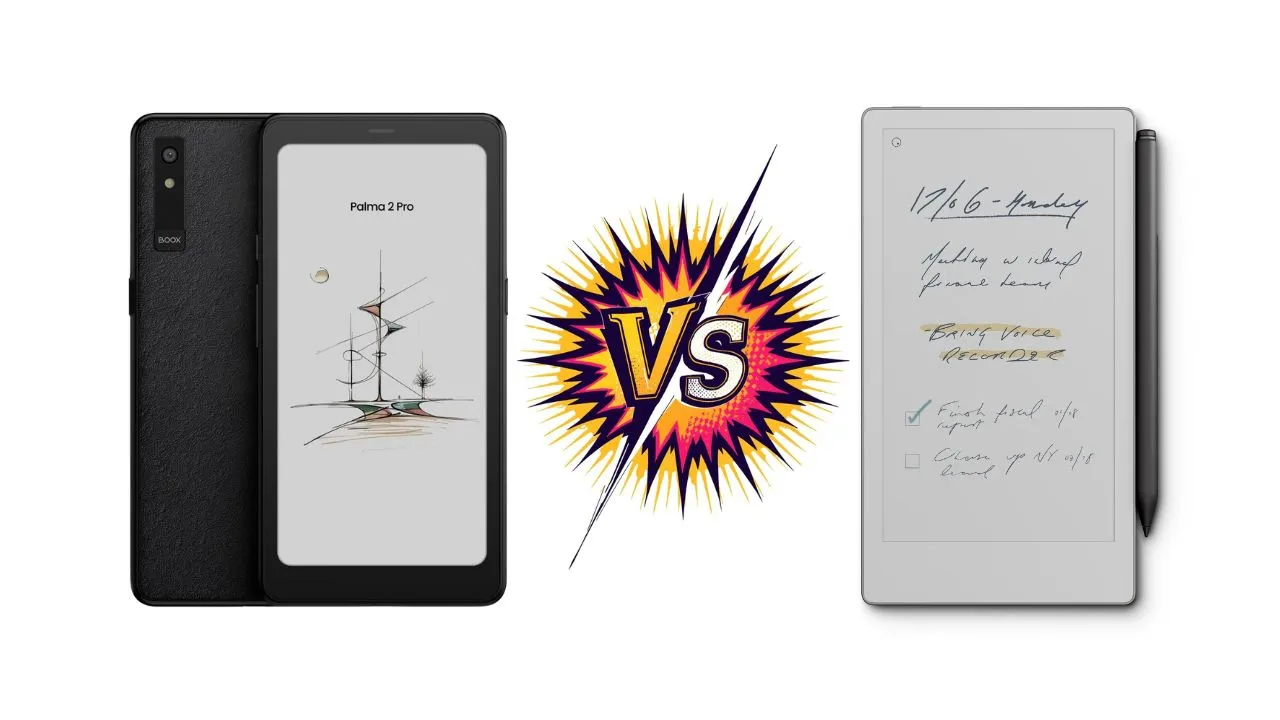
The e-ink market just got more interesting. Two pocket-sized devices now compete for your attention: the Boox Palma 2 Pro and the reMarkable Paper Pro Move. Both promise portability and productivity, but they take wildly different approaches. Boox pitches the Palma 2 Pro as a tiny Android e‑ink computer that lives in your pocket, while reMarkable frames the Paper Pro Move as a compact, focused writing tablet that feels like digital paper.
Here is why that core difference matters more than any spec sheet if you want the right device for reading, note‑taking, or work.
At A Glance: Which One Suits You?


| Priority | Better pick | Why it fits |
|---|---|---|
| Pocketable e‑reader + apps | Boox Palma 2 Pro | Phone‑like 6.13-inch form factor, Android, 5G data, full app store. |
| Pure writing tablet | reMarkable Paper Pro Move | Bigger 7.3-inch canvas, tuned pen tools, distraction‑light OS. |
| Color notes and sketches | Paper Pro Move | E Ink Gallery 3 color with more natural tones, higher color PPI. |
| Audiobooks, podcasts, Kindle, Notion style apps | Palma 2 Pro | Runs Android with Google Play and Boox’s reader, plus audio support and speakers. |
| Minimal, focused workflow | Paper Pro Move | Locked‑down OS with only reMarkable’s own apps and tools. |
Key Specs Comparison
| Spec | BOOX Palma 2 Pro | reMarkable Paper Pro Move |
|---|---|---|
| Display tech | 6.13″ E Ink Kaleido 3 color screen (4,096 colors) | 7.3″ Canvas Color display (can render 20,000 colors) |
| Resolution / PPI | B/W: 824 × 1648 (300 ppi); Color: 412 × 824 (150 ppi) | 1696 × 954 (264 PPI) |
| Front light | Front Light with CTM (warm/cold) | Adjustable reading light |
| OS | Android 15 | Codex OS |
| CPU | Octa-core Snapdragon 750G | 1.7 GHz Dual Core Cortex-A55 |
| RAM | 8GB | 2 GB |
| Storage | 128GB | 64GB |
| Wireless | Wi‑Fi + Bluetooth 5.1 | Wi‑Fi 2.4 GHz and 5 GHz |
| Cellular / SIM | Hybrid SIM slot; supports 2G/3G/4G/5G networks (data-only SIM noted) | N/A |
| USB | USB‑C (supports OTG or can be used as an audio jack) | USB 2.0 high-speed Type‑C port |
| Camera / mic / speaker | 16MP rear camera with LED flash; built-in speaker and dual microphones | N/A |
| Battery | 3,950 mAh | 2,334 mAh |
| Dimensions | 159 × 80 × 8.8 mm | 195.6 x 107.8 x 6.5 mm |
| Weight | Approx. 175 g | 230 g |
Let’s break it down in more detail.
Display And Reading Comfort
The Palma 2 Pro uses a 6.13-inch (resolution 824 x 1648) Kaleido 3 panel that adds a color filter on top of a mono e‑ink layer, which gives you up to 4,096 colors at 150 ppi in color and 300 ppi in grayscale. Colors appear muted compared with an LCD, and the gray “canvas” appears quite dark unless you keep the front light on.
The color quality on the Palma 2 Pro varies based on the refresh mode you use. Color saturation is a weakness of Kaleido 3. You lose certain color details because Kaleido 3 limits the number of colors. For example, when using Google Maps on the Palma 2 Pro, you cannot see building outlines unless you severely tweak the colors. Even then, the resulting colors can look strange.
The reMarkable Paper Pro Move takes a different path with Canvas Color (E Ink Gallery 3). This technology steers cyan, magenta, yellow, and white micro-capsules to mix up to 20,000 colors. The colors on the 7.3-inch panel, with a resolution of 1696 x 954, look more natural and less filtered than on the Kaleido 3. The Paper Pro Move also shows less yellow tint than its larger sibling, Paper Pro, creating a more neutral viewing experience.
Both panels come in at around 300 ppi for black-and-white content, so text looks sharp on each. In practice, the larger 7.3-inch, 16:9-aspect-ratio canvas on the reMarkable provides more space for handwriting and PDFs, while the 6.13-inch Palma is better suited to long‑form reading and quick notes.
Front Lighting Systems
Both devices feature front lighting, but they handle it differently. The Palma 2 Pro offers Color Temperature Management (CTM), allowing you to adjust both cool and warm light. You get 32 levels of light temperature adjustment. This adjustment is essential for the Palma 2 Pro: the Kaleido 3 E-Ink canvas appears dark when the front light is disabled. You must enable the front light most of the time to improve contrast and visual quality. Even at 20 out of 32 brightness levels, the light is insufficient and requires a setting around 28 for a good experience. Fortunately, battery life remains quite good even when the front light is left on constantly.
The Paper Pro Move also includes a built-in front light. This light is fixed at around 4,500 Kelvin, which feels neutral, and the device does not offer adjustable color temperature. This is a limitation for a device in its price range. The front light improves usability significantly. Everything looks nicer with it on, and you should keep the light on throughout the day. The uniformity of the front light on the Paper Pro Move shows improvement over the larger Paper Pro model.
Performance and core hardware
Inside, these devices live in different leagues. Palma 2 Pro runs a Snapdragon 750G with 8 GB of RAM, which puts it close to mid‑range Android hardware and keeps scrolling and app switching snappy for an e‑ink device. That performance headroom matters if you juggle multiple apps, read heavy PDFs, or use streaming audio. Plus, you can install any Android app from the Google Play Store, from Kindle to Netflix. The device handles multiple apps smoothly, though video playback looks poor on e-ink.
The Paper Pro Move uses a dual‑core Cortex‑A55 CPU with 2 GB of LPDDR4x RAM. The specs sound modest, but the device only runs its proprietary operating system. You cannot install third-party apps here. However, it feels responsive in reMarkable’s own apps, with very low pen latency and smooth zooming and panning within notebooks and documents, but it is not designed for heavy multitasking or third‑party workloads.
The performance gap shows when you compare use cases. The Palma 2 Pro can handle anything Android does, from navigation apps to social media. The Paper Pro Move stays focused on its core function without distractions.
Storage Capacity and Expansion
The Boox Palma 2 Pro includes 128GB of internal storage. The hybrid SIM slot accepts either a microSD card or a nano SIM for 5G data. You can expand storage if needed, though 128GB is enough to hold thousands of books and documents.
The reMarkable Paper Pro Move ships with 64 GB of storage. You can’t expand it, but the cloud sync through reMarkable Connect handles overflow. The free tier keeps synced notes in the cloud for a limited window. The Connect subscription unlocks unlimited cloud storage for $3 per month or $30 per year.
Battery Life and Charging
Battery size tells a similar story. Palma carries a 3,950 mAh pack, and it lasted around 20 hours of mixed real‑world use with the light on, plus about 4 percent overnight drain. Used like an e‑reader and a notebook with some restraint, it can stretch for weeks between charges thanks to e‑ink’s low idle draw.
The Move’s 2,334 mAh battery holds up well for pure note‑taking, with roughly 5.5 hours of continuous writing in tests, but drops off more quickly for colored PDFs, sometimes around five hours. Text-only PDFs stretch it to approximately seven hours. To compensate for the smaller battery capacity, fast charging helps to top up the battery around 90 percent in under an hour.
Connectivity, OS, and ecosystem
Here, the Palma 2 Pro feels like a phone that traded OLED for e‑ink. It runs Android 15 with Google Play, supports Wi‑Fi at 2.4 and 5 GHz, and accepts a data‑only 5G SIM in its hybrid slot. You cannot place traditional voice calls or send carrier SMS, but you can use messaging and VoIP apps over data, and the device handles GPS for navigation.
That setup turns the Palma into a pocketable reading and productivity hub. You can install Kindle, Kobo, Libby, RSS readers, Obsidian‑style apps, podcast players, and more, then sync notes and documents through whatever services already fit your workflow. Boox’s own library and sync tools also let you move notebooks between its larger tablets and the Palma. You can access the same document on multiple Boox devices, and annotations sync automatically. The system also works with apps like OneNote for cross-platform note-taking.
The Paper Pro Move sits on reMarkable’s Codex OS, a custom Linux‑based system focused on distraction‑light note‑taking and reading. Simplicity is a specific feature of the Move. The Move does not support third-party apps. It only runs reMarkable’s own apps, so there is no Kindle, Notion, or Play Store.
You move content through the company’s desktop and mobile apps or via cloud sync. It uses the reMarkable Connect cloud service. Syncing happens automatically and is straightforward. Notes remain in the cloud for a limited time on the free tier.
The Connect subscription unlocks more advanced features such as handwriting search, extended cloud storage, and sharing conveniences, while the base experience still covers core note‑taking and PDF work.
Writing and Note-Taking Experience
Both devices support USI‑style active pens, yet they land very differently if you care about handwriting.
On the Palma 2 Pro, Boox’s Inksense pen (and some third‑party USI pens) offer 4,096 pressure levels with tilt and palm rejection. The writing experience is accurate enough for fast handwriting and quick sketches, with a textured tip and matte glass that gives a bit of bite rather than a slippery feel. The display size is small, limiting how many words you fit onto a single line.
Latency sits higher than on dedicated drawing tablets, and some Android apps show more lag because they lack Boox’s drawing optimizations, but for daily notes, it holds up.
reMarkable’s Marker for the Paper Pro Move locks to its own device family and charges magnetically on the tablet’s side, waking the device when you remove it. That integrated design matters day‑to‑day because you never have to plug the pen in or think about pairing.
The writing experience feels more like an accurate sketchbook on the Move. The scratchy, paper‑like surface and very low latency are highlights of the platform. Pen input is precise, even when writing very small. The Paper Pro Move has excellent responsiveness. However, it still exhibits the wobbly diagonal lines found on its larger sibling, which may bother artists more than writers.
On software tools, the Move inherits the full Paper Pro set: multiple pen types, layers, templates, infinite‑style scrolling pages, manual handwriting‑to‑text conversion, and very polished zoom and pan. Each tool responds to pressure and tilt where appropriate. The layer system helps separate content, and pages scroll in both directions. You can zoom freely for detailed work. Handwriting-to-text conversion works reliably but requires manual triggering.
Here’s the controversial part: handwriting search lives behind a paywall. You need the reMarkable Connect subscription to search your handwritten notes. This feature should come standard on a $449 device.
Boox’s notes app on the Palma brings its own layers, pen styles, infinite canvas options, and handwriting tools, plus the huge advantage of Android: if you prefer OneNote, Evernote, or another system, you just install it. Not every third‑party app feels great on e‑ink, though, and some show heavy latency or odd color behavior, so you may spend time tweaking refresh modes.
Reading, PDFs, And Content Management
If your primary use is reading, the balance shifts toward Palma. Boox’s NeoReader experience is among the strongest in the e‑ink world, with good font control, margins, contrast adjustments, auto-page-turn timers, and solid annotation tools. With Android, Palma easily handles EPUB, PDF, web articles, RSS feeds, manga apps, and audiobook players. The device also runs Kindle, Kobo, and other reading apps perfectly. PDF reflow works well for text extraction.
The 6.13-inch screen feels natural for ebooks, news, and webtoons, while dense comics and full‑page panel layouts often look cramped, even when zoomed in. Color helps, but Kaleido’s limited palette and lower color ppi mean you still trade away punch and detail compared with a tablet.
The Paper Pro Move reads EPUB and PDFs with good text rendering and among the best zoom‑and‑pan behavior in the e‑ink space, yet the overall reading feature set stays basic. There is no built‑in store, no Kindle app, and only rudimentary font options and layout tools for ebooks. For PDFs, annotation feels great thanks to the pen and software, but the narrow 16:9 aspect ratio shrinks the page width in portrait and requires more zooming and panning than on a larger tablet.
On organization, reMarkable offers folders, tags, favorites, templates, and search (with a subscription), which keep a focused library manageable. Boox relies more on its Android file system and app‑specific libraries, but that openness lets you organize notes and books in your preferred stack rather than a single vendor-controlled system.
Multimedia Capabilities
The Palma 2 Pro comes with multimedia hardware. It includes a 16MP camera and a flashlight. It has a speaker at the top and another speaker and a mic at the bottom. The device supports audio formats, including WAV and MP3. While you can watch videos on the display, the video-watching experience is not good. However, the advantage is that this design encourages you to watch fewer videos and spend less time on social media. The speakers are loud, and the audio book quality is decent.
The reMarkable Paper Pro Move has none of these features. It’s purely a note-taking and reading device.
Design, Build, And Portability
The Palma 2 Pro looks and feels like a slightly chunky smartphone. It measures about 159 × 80 × 8.8 mm, weighs around 175 grams, and slides into most jeans pockets. Its body features a sandstone-like texture back, curved sides, side buttons with a smart shortcut key, a side fingerprint reader, and a rear camera bump. A silicone case with a detachable flip cover and MagSafe‑style ring ships in Boox’s bundle, and the device also works with third‑party grips and stands.
The Paper Pro Move stretches to roughly 195.6 × 107.8 × 6.5 mm and weighs around 230 grams, closer to a slim paperback than a phone. It feels denser than its size suggests with an aluminum frame, layered “paper stack” edges, and a textured plastic back that is sturdy but slightly hollow compared with the full‑size Paper Pro. Rubber feet keep it stable on a desk, and magnetic folios and pen attachments complete the package.
Pocketability creates a clear split. Palma truly works as a coat or jeans pocket companion, especially with a grip stuck to the back, and fits easily in small bags. The Move fits in large jacket pockets and most bags, but rarely in standard pants pockets, which nudges it into “small tablet” territory rather than “always with you” gadget.
Use Cases: Which Device For Which Person?
| Use Case | Best Device | Why It Fits | Watch-outs |
|---|---|---|---|
| Mobile readers and commuters | Boox Palma 2 Pro | Pocketable e‑ink device for trains/airports/waiting rooms; supports ebooks/articles over Wi‑Fi/5G; handles audiobooks/podcasts; runs Android reading apps so you’re not locked into one ecosystem. | A smaller screen can feel cramped for dense PDFs and textbook layouts. |
| Students and academic work (PDFs + lecture slides) | reMarkable Paper Pro Move | Strong handwriting experience; built for class notes, templates, and PDF markup; supports structured notebooks (layers/tags) and handwriting-to-text cleanup workflows. | Full handwriting search is tied to the reMarkable Connect subscription. |
| Students and academic work (Android campus stack) | Boox Palma 2 Pro | Better fit when your study workflow depends on Android apps (reference managers, campus portals, cloud tools) because it runs on Android and integrates with existing workflows. | Screen size may limit comfort when reading heavy PDFs or textbooks. |
| Professional note-takers and knowledge workers | reMarkable Paper Pro Move | Works like a focused digital notebook for meetings, planning, and brainstorming; distraction-light OS keeps attention on notes; designed to live next to a laptop and sync cleanly. | Less flexible if you want third-party apps and “do-it-all” workflows. |
| Professionals who travel + need multi-app flexibility | Boox Palma 2 Pro | Compact “one-device” option for reading + reference + light note-taking on the go; pairs well with email/calendar/document apps for quick PDF markup and sharing. | Trades writing comfort and screen real estate for portability and app flexibility. |

Boox Palma 2 Pro: key Pros And Cons
Strengths:
- Genuine pocket‑friendly form factor with low weight.
- Android with the Play Store so that you can run Kindle, Libby, note-taking apps, and productivity tools.
- 5G data support, Wi‑Fi, GPS, speakers, and a microphone for connected use.
- Strong text readability, flexible lighting, and long potential standby life.
- Solid Boox notes app plus support for infinite canvas and advanced readers.
Weaknesses:
- No voice calls or SMS despite phone‑like hardware.
- Kaleido 3 looks dark without a bright front light and offers limited color fidelity.
- The small screen feels tight for complex PDFs, comics, and large diagrams.
reMarkable Paper Pro Move: key Pros and Cons
Strengths:
- Excellent writing feel, low latency, tuned tools, and a satisfying, textured surface.
- Clean, distraction‑light OS that focuses on notes and documents.
- More neutral color rendering than the larger Paper Pro, with an even front light.
- Strong PDF annotation with excellent zoom and pan controls.
- A magnetic pen-and-folio system that feels cohesive and convenient.
Weaknesses:
- A narrow 16:9 aspect ratio can feel awkward for portrait writing and cramped for some notes.
- No third‑party apps or built‑in bookstore, and only basic ebook features.
- Handwriting search is tied to a paid Connect subscription.
Final Verdict: Who wins?
For a tech-savvy reader in their late twenties who juggles ebooks, manga, Webtoons, podcasts, and cross-platform notes, the Boox Palma 2 Pro usually wins. It packs Android 15, a fast Snapdragon chip, generous storage, data-capable connectivity, and a surprisingly capable note app into a device that vanishes into a pocket.
For someone who wants a premium, durable, color E Ink notebook that prioritizes writing comfort, design details, and mental focus, the reMarkable Paper Pro Move stands out. It feels like a carefully crafted tool, not a general gadget, and that focus makes it the better choice if handwriting quality and a calm workspace matter more than flexibility.
Frequently Asked Questions
No, the Palma 2 Pro’s hybrid SIM slot supports data-only 5G connectivity, not voice calls or SMS.
No, the Paper Pro Move runs on the proprietary reMarkable OS and focuses exclusively on native reading and note-taking features, with no third-party app support.
The reMarkable Paper Pro Move’s Canvas Color (E Ink Gallery 3) technology generally offers more natural color reproduction, while the Boox Palma 2 Pro’s Kaleido 3 provides 4,096 colors but with less saturation.
Yes, both devices use E-paper technology, which remains readable in direct sunlight without glare, unlike LCD or OLED screens.
The device runs Android and looks like a smartphone. However, it lacks cellular calling capabilities, focusing instead on reading and productivity apps via 5G data.
Yes, the Move includes handwriting-to-text conversion for easy sharing via digital formats.
Recommended Reading
14 Boox Palma Tips and Tricks: Master Your E-Ink Device
After choosing between these two devices, unlock the full potential of your Boox Palma 2 Pro with essential productivity shortcuts, hidden Android customizations, and optimization techniques that transform this pocket-sized e-ink reader into a streamlined mobile workstation for reading, note-taking, and on-the-go content management.
20 reMarkable Tips & Tricks Every reMarkable Owner Should Know
Maximize your reMarkable Paper Pro Move investment by discovering advanced handwriting techniques, workflow automation features, PDF annotation strategies, and lesser-known interface shortcuts that elevate your digital note-taking experience from basic functionality to professional-grade productivity tool for meetings, research, and creative work.